
If you own a local business, hiring a web design company can feel like walking into a hardware store without knowing the names of the tools. You know you need a website that brings in calls, bookings, or sales, but agencies talk about “UX,” “CMS,” “local SEO,” “integrations,” and “maintenance” as if everyone builds websites for a living.
This guide breaks down web design company services in plain English, with a focus on what matters for local businesses (especially in competitive markets like Los Angeles and the Inland Empire). The goal is to help you buy the right things, avoid paying for the wrong things, and know what “done” should actually look like.
What “web design company services” usually include (and what each one does)
A good web partner does more than “make it look nice.” Most professional web design companies offer a bundle of services that span strategy, design, development, launch, and ongoing growth.
Discovery and website strategy
This is the planning stage where your developer learns your business, customers, and how you win deals.
Typical outcomes include:
- A clear goal for the site (calls, form leads, bookings, purchases)
- A recommended site structure (pages and navigation)
- A plan for what content is needed and who provides it
- Technical requirements (integrations, booking tools, CRM, etc.)
If you skip discovery, you often end up redesigning the redesign because the site looks fine but fails to convert.
UX and UI design (user experience and user interface)
UX is how the site works and flows. UI is how it looks.
For local businesses, UX is usually about removing friction:
- Make it obvious what you do within seconds
- Put contact and booking actions where people expect them
- Make service areas, pricing ranges, or availability easy to understand
- Ensure mobile users can call, get directions, or request a quote quickly
Custom web development (front-end and back-end)
Development is the actual build.
Depending on your needs, this can mean:
- Building a custom theme or layout system
- Developing custom features (filters, quote calculators, portals)
- Setting up a CMS so you can edit pages without a developer
- Connecting the site to your business tools
CMS setup and content editing experience
Most small businesses need a site that is easy to update. A web design company may set you up with a CMS (content management system) and configure:
- Page templates (so new pages stay consistent)
- Blog posting workflows
- User roles (who can edit what)
- Basic training and documentation
E-commerce development
If you sell products, services, memberships, or digital goods, e-commerce services can include:
- Product setup (variants, categories, tags)
- Shipping and tax configuration
- Checkout optimization
- Payments and fraud prevention basics
- Abandoned cart and email flows (depending on platform)
A quick example: if you’re setting up a print and poster store, you’ll want clean product pages, size options, and straightforward shipping expectations. Seeing how a specialized catalog is presented can help you define what you like. You can browse a live example of a poster-focused storefront at ready-to-hang art prints and posters.
SEO and local optimization
“SEO” can mean a lot of things. For local businesses, it should at least include:
- Technical SEO fundamentals (indexing, crawlability, clean URLs)
- On-page SEO (titles, headings, internal linking)
- Local signals (service area targeting, location pages if needed)
- Performance work (fast pages, optimized images)
Google has been explicit that page experience and performance matter, and Core Web Vitals are part of that conversation. Their documentation is a good baseline reference: Google Search Central on Core Web Vitals.
Integrations, automation, and CRM work
Many local businesses lose leads because forms go nowhere, follow-ups are slow, or information is scattered across tools.
A web design company may help connect your website to:
- Email marketing platforms
- CRMs
- Booking/scheduling systems
- Payment processors
- Live chat or SMS tools
- Inventory or order management (for e-commerce)
In more advanced cases, teams offer workflow automation or even custom CRM development to match how your business actually operates.
Analytics, tracking, and conversion measurement
A website should not be a “launch and pray” project.
At minimum, you want:
- Analytics installed correctly
- Conversion events defined (calls, forms, bookings, purchases)
- A simple reporting view so you can see what’s working
Ongoing support and maintenance
Websites are software. Software needs upkeep.
Maintenance services commonly include:
- Security updates and plugin updates
- Backups and uptime monitoring
- Fixes for random issues (forms breaking, layout bugs)
- Small content edits or improvements
Which services matter most, based on your type of local business
Not every business needs the same build. A salon, a contractor, and a local retailer may all need “a website,” but the highest ROI services differ.
| Local business type | Website goal | Services that usually matter most |
|---|---|---|
| Service-area business (HVAC, plumbing, cleaning) | Phone calls and quote requests | Local SEO foundations, fast mobile UX, strong service pages, conversion tracking, CRM or automation for follow-up |
| Appointment-based (salons, med spas, clinics) | Bookings | Booking integration, clear pricing or packages, trust signals (reviews, credentials), mobile-first design |
| Local retail or showroom | Store visits and calls | Local landing pages, directions/hours clarity, product highlights, strong photo content, Google Business Profile alignment |
| Professional services (law, accounting, consulting) | Qualified leads | Authority content structure, case studies, fast site performance, conversion-focused contact flows |
| E-commerce brand (local or national) | Online sales | Product page UX, checkout optimization, email flows, analytics, SEO architecture |
If you’re unsure what bucket you fall into, your web partner should help you map your business model to a clear site structure and lead flow.
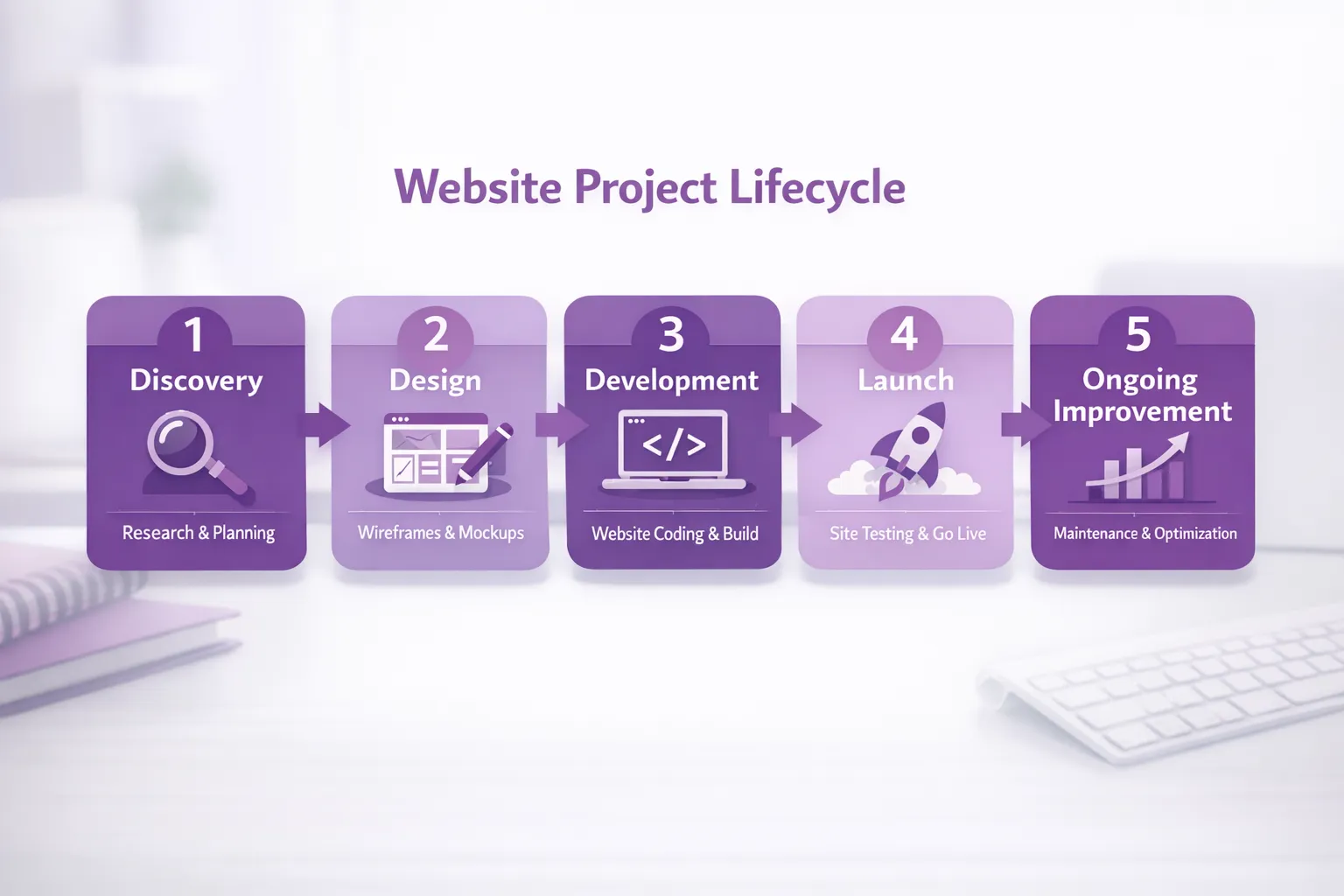
The typical web design process (so you know what to expect)
One of the biggest frustrations for small businesses is not knowing what happens between “we hired someone” and “the site is live.” Here is a common, healthy process.
| Phase | What you should receive | What the business must provide | Common risk if skipped |
|---|---|---|---|
| Discovery | Goals, scope, site map outline | Clear offer, target service area, competitors | Site looks good but doesn’t convert |
| Content planning | Page list, content requirements | Existing copy, photos, offers, FAQs you get from customers | Last-minute scramble delays launch |
| Wireframes | Layouts without final design | Feedback on flow and priorities | Design debates start too late |
| Visual design | Page designs, style guide | Brand assets, examples of styles you like | Endless revisions without direction |
| Development | Staging site to test | Approvals, tool logins, integration details | Broken forms, missing tracking |
| QA and launch | Tested live site, redirects, tracking | Final sign-off | SEO losses, technical issues |
| Post-launch | Fixes, iteration plan | Ongoing feedback and results | Site stagnates and underperforms |
Deliverables you should ask for (to avoid vague promises)
To keep your project from becoming “a website, eventually,” ask your web design company to define concrete deliverables.
Strong deliverables often include:
- A site map showing every page being created
- Wireframes for key pages (home, service page template, contact)
- Design comps (desktop and mobile)
- A staging link where you can review the build before launch
- Basic SEO setup (page titles, meta descriptions, indexation settings)
- 301 redirects if you’re replacing an old site (important for preserving rankings)
- Analytics and conversion tracking installed and tested
- Post-launch support window for fixes and adjustments
If a proposal doesn’t mention any of this, you can still hire the company, but you should tighten the scope before you sign.
Local SEO basics that should be built into the website (not bolted on later)
For local businesses, “SEO” is not just blogging. It’s also whether your core pages communicate location, relevance, and trust.
Here are website elements that support local visibility and conversion:
Clear location signals
- Your service area should be obvious (not hidden in the footer)
- Your NAP (name, address, phone) should match your other listings
- If you have multiple locations, each location may need a dedicated page
Structured data (schema)
Schema can help search engines understand your business type, location, and key details. It won’t instantly rank you, but it supports clarity and can reduce ambiguity.
A reputable overview is available from Google Search Central on structured data.
Performance and mobile usability
Local traffic is heavily mobile. If your site is slow or hard to use on a phone, your leads leak out.
Review and trust placement
A web design company can help you place reviews, badges, licensing info, guarantees, and case studies where they influence decisions (not where they get ignored).
Lead generation and digital marketing services (when they make sense)
Many web design companies also offer lead generation and digital marketing. For local businesses, the best time to add marketing is when:
- You have a clear offer and service area
- Your site has strong conversion paths (calls, forms, booking)
- You can track which channels produce real customers
Common growth services include:
- Landing pages for specific services or neighborhoods
- Google Ads and paid social landing page builds
- Email capture and follow-up sequences
- CRM setup and pipeline tracking
The key is sequencing. If your website foundation is weak, marketing spend often just sends more people into a leaky bucket.
How pricing usually works (and what drives cost)
Web design costs vary widely, but the drivers are usually consistent. A proposal is typically shaped by:
- Scope: How many pages, and how unique each page is
- Content: Who writes it, who provides photos, whether new photography is needed
- Functionality: Booking, e-commerce, calculators, portals, custom features
- Integrations: CRM, scheduling, payments, automation
- SEO depth: Basic setup versus a full local content and optimization plan
- Timeline: Faster turnaround often requires more dedicated capacity
- Ongoing support: Maintenance, improvements, and marketing retainers
If two quotes are far apart, ask what assumptions were made about content, integrations, and post-launch support.
How to choose the right web design company for a local business
The “best” vendor is usually the one that understands your customers and can execute reliably. When comparing options, focus on evidence and process.
Questions worth asking
- What does your discovery process look like, and what do you deliver from it?
- How will you make sure the site generates leads (not just traffic)?
- What will be editable by our team after launch?
- How do you handle local SEO foundations during the build?
- What is your QA process before launch?
- What does ongoing support include, and what counts as out of scope?
Red flags
- No mention of mobile experience, performance, or tracking
- “SEO included” with zero specifics
- Vague timelines and unclear deliverables
- A portfolio that looks good but has confusing navigation or slow load times
A practical way to apply this if you’re in LA or the Inland Empire
Local markets are competitive, and small differences in speed, clarity, and follow-up can change your lead volume dramatically. If you want a partner who can handle custom web design, development, integrations, and local optimization with a collaborative approach, you can explore Brother Web Design and use the service explanations above as your checklist when you request a scope.
The best outcome is not a “new website.” It’s a site that loads fast, explains your offer clearly, builds trust quickly, and routes leads into a system where they actually get followed up.