
Running a small business in Los Angeles (or the Inland Empire) usually means you are doing three jobs at once: delivering the service, managing the team, and trying to keep leads moving without dropping the ball. A CRM with marketing automation is one of the few upgrades that can genuinely help you do more with less, because it turns your follow-up, reminders, and lead nurturing into a repeatable system instead of a daily scramble.
This guide breaks down what “CRM with marketing automation” actually means, the workflows that create the biggest payoff for local businesses, and how to roll it out without turning your week into an implementation project.
What a “CRM with marketing automation” actually is
A CRM (Customer Relationship Management system) is where you store and manage contacts, deals, and customer history. Marketing automation is the layer that triggers actions based on behavior or time, without someone manually sending every message.
When combined, you get one system that can:
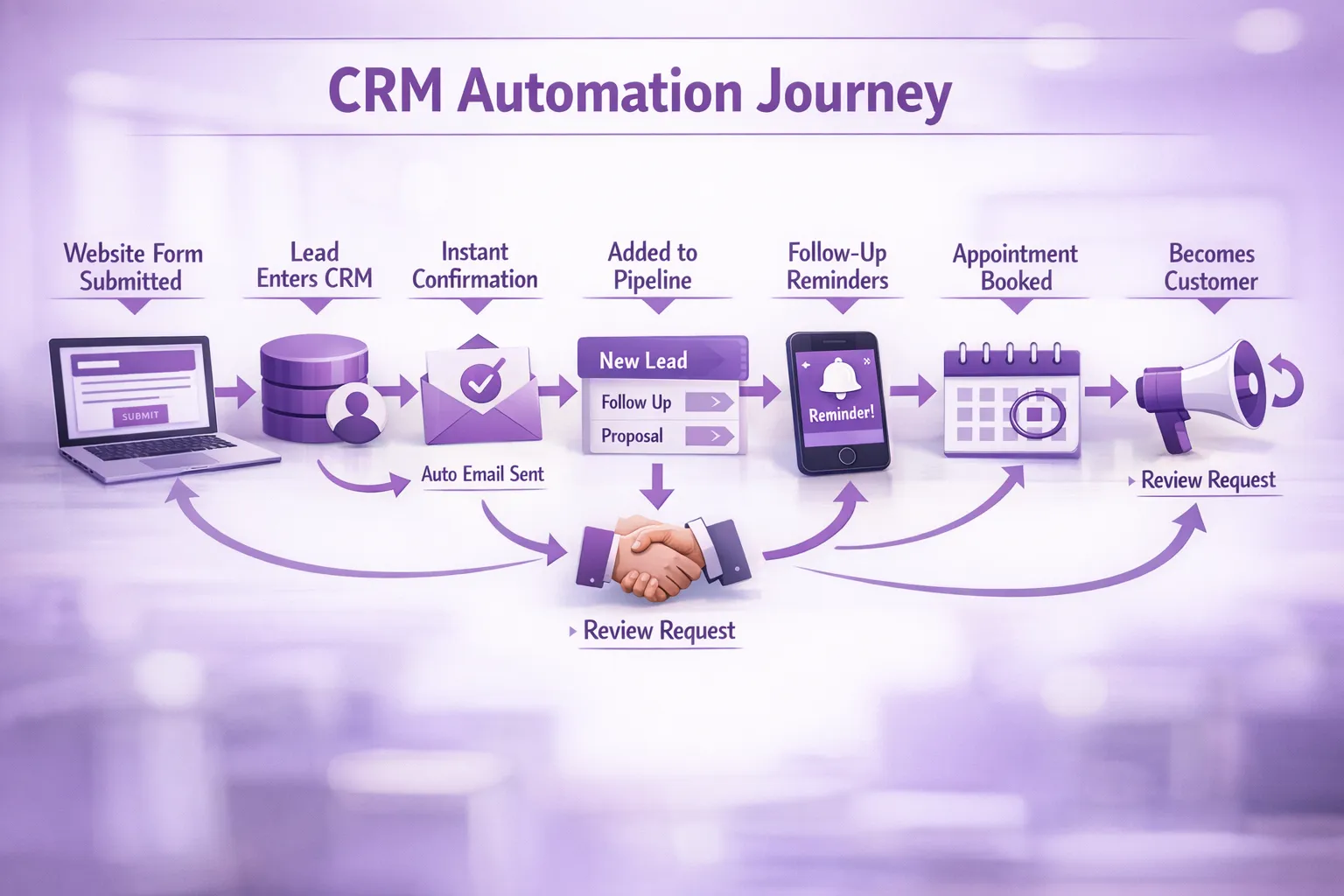
- Capture a lead from your website or ads
- Immediately send a text or email confirmation
- Assign the lead to a salesperson, or to you
- Remind the lead to book, show up, or pay
- Re-engage past customers at the right time
The key idea is simple: your sales and marketing “memory” moves from your head and inbox into a consistent process.
Why it helps you “do more with less” (in practical terms)
Most local businesses do not lose revenue because they lack leads. They lose revenue because follow-up is slow, inconsistent, or invisible.
A CRM with marketing automation reduces that leakage by making three things reliable:
1) Speed-to-lead becomes automatic
If someone fills out a form at 9:47 pm, an automated confirmation can go out at 9:47 pm. That alone can prevent leads from cooling off, especially in competitive LA markets where customers request multiple quotes.
2) Follow-up becomes consistent (even when you are busy)
Automation handles the “I meant to check back” messages, appointment reminders, estimate follow-ups, and review requests that often get skipped during busy weeks.
3) Everyone sees the same pipeline
Instead of “Where is that lead?” living in texts and sticky notes, the CRM becomes the single source of truth. That makes it easier to delegate without losing control.
4) You can measure what is working
Even basic reporting like “lead source” plus “won deal value” changes how you spend money on ads, SEO, and partnerships.
5) You reduce tool sprawl
Many businesses end up with a form tool, an email tool, a texting tool, a spreadsheet, and a calendar that do not talk to each other. A CRM with marketing automation can replace or unify several of those pieces.
Here is the shift you are aiming for:
| Area | Without automation | With CRM + automation |
|---|---|---|
| Lead intake | Form notifications, manual entry, missed messages | Leads captured and logged automatically |
| Response time | Depends on your availability | Instant confirmation + routing |
| Follow-up | “When I remember” | Scheduled sequences and reminders |
| Appointments | No-shows and reschedules handled manually | Reminder flows, pre-visit instructions |
| Re-engagement | Past customers forgotten | Automated check-ins and seasonal campaigns |
The highest-ROI automations for local businesses
You do not need 50 automations. Most small service businesses see the biggest impact from a few core workflows that protect revenue.
Lead capture and immediate reply
This is the foundation. When someone submits a form, calls, or messages you, the system should:
- Create the contact and opportunity automatically
- Send a confirmation (“Got it, here is what happens next”)
- Ask one clarifying question that speeds up quoting (zip code, service type, budget range, preferred time)
Missed-call text back
For contractors, home services, med spas, clinics, and professional services, missed calls are common. A simple automation like “Sorry we missed you, what do you need help with?” can recover leads you would otherwise lose.
Quote and estimate follow-up
Most prospects do not say “no.” They go silent.
A practical follow-up sequence can be:
- Day 1: “Any questions about the estimate?”
- Day 3: “Want to schedule this week?”
- Day 7: “Last check-in, happy to adjust scope if needed.”
The goal is not to nag, it is to make it easy to say yes.
Appointment reminders and pre-visit instructions
If you book appointments, you want confirmations and reminders that reduce no-shows and last-minute reschedules. This is especially valuable in dense areas where traffic and parking affect punctuality.
Post-service review request (and issue capture)
Local growth is often review-driven. Automations can request a Google review after a completed job, but they can also add a “pulse check” first so unhappy customers are routed to support before they leave a negative review.
Reactivation campaigns for past customers
If your service has a natural repeat cycle (seasonal tune-ups, dental cleanings, car detailing, recurring maintenance), automation can trigger reminders at 60, 90, or 180 days.
The “directory test” for choosing the right CRM
A good CRM with marketing automation behaves like a well-organized directory: it categorizes, filters, and ranks information so you can act quickly. If you have ever seen a niche listing site that lets users filter by category, popularity, and details, you already understand the principle. For example, this kind of filterable directory and ranking system (in a totally different niche) shows how structure makes decision-making faster: filterable directory and ranking system.
In business terms, that same structure is what turns a messy list of contacts into an actual revenue engine.
What to look for in a CRM with marketing automation (without getting technical)
Most buying mistakes happen because businesses choose a CRM based on brand familiarity, not on their real workflow.
Must-have capabilities for most small businesses
You typically want:
- Easy contact and deal management: stages that match how you sell (new lead, contacted, estimate sent, booked, closed)
- Automation triggers: form submit, missed call, appointment booked, invoice paid, stage changed
- Multi-channel messaging: at least email, often SMS depending on your industry
- Simple reporting: lead sources, conversion rates, pipeline value, win rate
- Integration options: your website forms, calendar, payments, and ads platform if relevant
Local-business realities that matter
A few non-obvious considerations:
- Mobile usability: if you are taking calls in the field, the CRM must work well on your phone
- Permission and compliance: texting and email marketing require proper consent in many cases (for the US, you will often hear about TCPA for texts and CAN-SPAM for email). The FTC’s CAN-SPAM guidance is a useful starting point.
- Deliverability: a fancy email sequence is worthless if it lands in spam. Ask how the platform handles domains, authentication (SPF/DKIM), and sending reputation
A realistic 30-day rollout plan (that won’t derail the business)
Most implementations fail because they try to boil the ocean. A better approach is to launch a minimum viable system, then improve it.
| Week | Focus | Outcome |
|---|---|---|
| Week 1 | Define pipeline stages, import contacts, connect your website forms | Leads stop living in inboxes and texts |
| Week 2 | Set up lead auto-reply, missed-call text back, and internal notifications | Faster response and fewer lost leads |
| Week 3 | Add appointment reminders and estimate follow-up | Better show-up rates and higher close rate |
| Week 4 | Add review requests and a simple reactivation campaign | More reviews, more repeat business |
If you only do Weeks 1 and 2, you still get meaningful value. The key is getting the lead intake and routing right first.
Common mistakes that make automation feel “spammy” or ineffective
Marketing automation has a reputation problem because people set it up poorly. Here are the issues that most often cause results to stall.
Automating before your message is clear
If your offer and positioning are unclear, automation just spreads confusion faster. Write the core messages first:
- What problem you solve
- Who you solve it for (and who you do not)
- What the next step is (call, book, request a quote)
Too many automations, not enough intent
More automations do not mean more revenue. Start with high-intent triggers (form submit, missed call, estimate sent) before you build nurture sequences.
Dirty data and duplicate contacts
If you import contacts from multiple sources without cleanup, your reporting becomes unreliable and customers may get duplicate messages.
No ownership
Someone must own the CRM weekly. That does not mean living in it all day, it means:
- Checking the pipeline daily
- Fixing stuck deals
- Updating tags and lead sources when needed
Ignoring the handoff between marketing and sales
Even if it is just you, define what “qualified” means. If you have a small team, define who calls first, how fast, and what happens if the lead does not answer.
How to measure success (simple metrics that matter)
You do not need advanced analytics to know if a CRM with marketing automation is working. Track a few numbers consistently:
| Metric | Why it matters | What “good” looks like |
|---|---|---|
| Speed to first response | Faster follow-up usually increases conversions | Minutes, not hours (when possible) |
| Lead-to-appointment rate | Shows if your intake and follow-up work | Trending up over time |
| Show-up rate | Protects your calendar and team capacity | Fewer no-shows month over month |
| Close rate | Reveals sales effectiveness | Improving as follow-up becomes consistent |
| Review volume | Impacts local trust and local SEO | Steady, predictable inflow |
The point is not perfection. The point is visibility, so you can improve what is actually happening.
Where a local dev team can help (and what to delegate)
If you are non-technical, the highest leverage is often delegating the parts that are easy to mess up:
- Connecting website forms properly (and ensuring every lead is tracked)
- Setting up integrations with your calendar, email domain, and business tools
- Building automation logic that matches your real process, not a generic template
- Cleaning data and defining pipeline stages
Brother Web Design builds custom web design and business systems for small businesses and startups, including CRM development, workflow automation, lead generation, and local optimization. If you want help choosing the right approach and implementing it cleanly, start with a simple goal: capture every lead, respond instantly, and never lose track of follow-up. Once that is in place, you can expand into nurture, retention, and deeper reporting without overwhelming your team.

Bottom line
A CRM with marketing automation is not about sending more messages. It is about building a reliable system that captures leads, follows up consistently, and turns your day-to-day hustle into predictable operations.
If you are deciding where to start, focus on the automations that protect revenue first: lead capture, immediate response, missed-call recovery, estimate follow-up, and appointment reminders. Those few workflows can create outsized returns, especially for local businesses competing for attention across LA and the Inland Empire.