
Choosing a website platform in 2025 is less about “what’s popular” and more about what you need the site to do for your business. A local service business in Los Angeles that mainly needs calls and quote requests will make a very different platform choice than a startup that needs a gated app, subscriptions, or a complex content strategy.
The good news is that today’s website building platforms are genuinely strong. The hard part is avoiding the wrong kind of “easy” (fast launch now, painful limitations later) or the wrong kind of “powerful” (flexible, but too complex to keep updated).
Below is a practical, non-technical guide to what to use in 2025, how to decide, and when it makes sense to go custom.
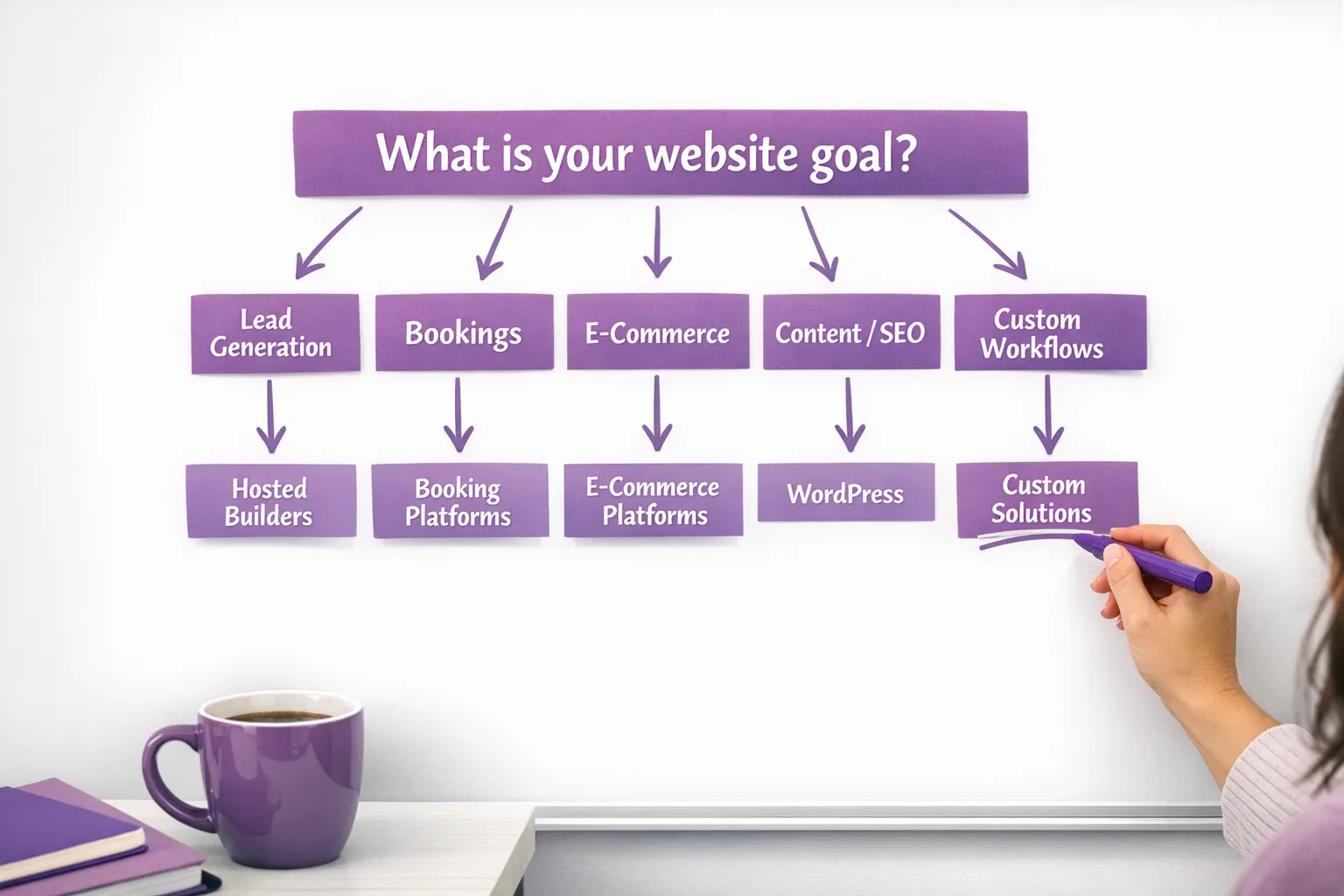
Step 1: Decide what the website must do (not just how it should look)
Before comparing platforms, get clear on the primary job of your site. Most small businesses fall into one of these buckets:
- Lead generation: calls, forms, quote requests, consultations, direction requests.
- Bookings: appointments, deposits, schedules, reminders.
- E-commerce: products, shipping, taxes, returns, inventory.
- Content and SEO growth: service pages plus blogs, location pages, FAQs.
- Custom workflows: CRM sync, internal dashboards, automation, portal logins.
If you try to pick a platform before you pick the goal, you end up optimizing for the wrong thing, like choosing a “beautiful template” that can’t rank locally, or picking a “powerful CMS” when you really needed a reliable booking and payment flow.
Step 2: Evaluate platforms using 7 criteria that matter in 2025
Most platform comparison articles focus on surface-level features. For a real business, the decision usually comes down to these fundamentals.
1) Ownership and portability
Ask: “If we outgrow this platform, can we move?”
- Some platforms are highly portable (you can migrate content and rebuild without being trapped).
- Others are walled gardens (fine if you stay forever, expensive if you need to leave).
This matters because many businesses in LA start with a simple site, then add SEO, landing pages, CRM integrations, or e-commerce later.
2) SEO foundations (especially for local search)
In 2025, SEO is still foundational for local businesses, even if you run ads. Your platform should support:
- Full control of page titles, meta descriptions, headings, and clean URLs
- Indexable content (not hidden behind weird scripts)
- Fast performance and mobile usability
- Schema markup support (LocalBusiness, Product, FAQ, etc.)
Google has been consistent that page experience matters, including speed signals like Core Web Vitals. See Google’s overview in Page Experience documentation.
3) Speed and performance
Performance is not just “nice to have.” It affects:
- Conversion rate (especially on mobile)
- Local SEO competitiveness
- Ad efficiency (landing page experience)
Some platforms make performance easy by controlling hosting. Others require more diligence (themes, plugins, image optimization, caching).
4) Editing workflow (who will update it?)
A platform that your team will not update becomes a liability. Be honest about who will manage:
- Adding service pages
- Updating hours and promos
- Publishing blogs
- Creating landing pages for ads
Non-technical founders often do best with a platform that has a clean editor and guardrails, as long as it doesn’t block SEO or integrations.
5) Integrations and automation
In 2025, your website is often just one piece of the system:
- Forms into a CRM
- Booking into reminders and follow-ups
- Payments into accounting
- Chat into lead routing
If you plan to scale lead handling, you want a platform that plays well with tools like Zapier/Make and your CRM, or you want a dev team that can build those connections reliably.
6) Security and compliance basics
Regardless of platform, you should treat security as a requirement, not an upgrade. That includes:
- SSL, backups, access control
- Updates and patching (especially for plugin-based systems)
- Accessibility, which is increasingly important for risk reduction and usability
For accessibility standards context, reference WCAG 2.2 from W3C.
7) Total cost over 24 months
The monthly subscription is rarely the real cost. Consider:
- Build time (DIY hours are real money)
- Maintenance and updates
- Plugin/app subscriptions
- Rebuild cost if you outgrow the platform
A “cheap” platform that forces a rebuild in a year can be more expensive than a slightly higher upfront investment in the right fit.
The 5 main types of website building platforms (and who each is best for)
Instead of arguing over brands, it helps to categorize platforms by how they work.
| Platform type | Examples | Best for | Main tradeoff |
|---|---|---|---|
| All-in-one hosted website builders | Wix, Squarespace | Fast launch, simple marketing sites, low maintenance | Less flexibility and portability over time |
| Open CMS you control | WordPress (self-hosted) | SEO-focused growth, content, flexibility, long-term ownership | Requires maintenance discipline (updates, security, plugin quality) |
| E-commerce-first platforms | Shopify, BigCommerce | Serious online selling, payments, inventory, shipping integrations | Monthly costs add up, design flexibility varies by theme and build |
| Visual “designer + CMS” platforms | Webflow, Framer | High-end marketing sites, modern design, fast iteration | Advanced features may require experienced setup and governance |
| Custom builds (frameworks/headless) | Next.js, headless CMS | Startups, custom apps, unique workflows, performance control | Higher upfront cost, needs a dev team for ongoing changes |
For most small local businesses, your best choice will be one of the first four. Custom builds are powerful, but you should only go custom when the business case is clear.
What to use in 2025 (practical recommendations)
Below are the most common “right answers” we see for small businesses and non-technical founders.
If you need to launch quickly and keep it simple: Squarespace or Wix
These platforms can be a good fit if:
- You want a clean brochure site fast
- You are not planning heavy SEO content or complex integrations
- You value low maintenance more than deep customization
Where businesses often get stuck is when they later need stronger local SEO structure, more flexible landing pages for campaigns, or deeper CRM and automation.
If SEO and long-term growth matter most: WordPress (built correctly)
WordPress is still a top option in 2025 for businesses that plan to invest in:
- Service pages + blog content
- Location targeting (LA neighborhoods, service areas)
- Technical SEO foundations
The key is “built correctly.” WordPress can be extremely fast and stable, but plugin overload and cheap themes can turn it into a maintenance problem. If you go this route, treat your plugin stack like you would treat vendors: fewer, better, and actively maintained.
If you’re comparing DIY versus having a team build and maintain it, you may find this helpful: Website Building Company vs DIY: Pros and Cons.
If you sell products online and want fewer headaches: Shopify
Shopify is often the simplest path to a reliable e-commerce operation because the platform is designed around:
- Checkout and payments
- Product management
- Shipping and tax workflows
- An ecosystem of e-commerce apps
It’s not always the cheapest, but for many small businesses it reduces operational risk.
If design quality and marketing agility are the priority: Webflow or Framer
For brands that care a lot about presentation and want to ship new landing pages quickly (especially for campaigns), Webflow and Framer have become serious contenders.
They tend to work best when:
- Someone on the team can own the publishing workflow
- You want modern design control without full custom code
- You want to iterate often (new offers, new pages, new messaging)
These platforms can also be excellent for startups that need a sharp marketing site while the product evolves.
If you expect custom workflows: choose a platform that won’t fight your systems
If your website must connect to your CRM, automate lead routing, sync data, or support internal workflows, you have two realistic paths:
- Use a flexible platform (often WordPress, Shopify, or a custom build) and invest in clean integrations.
- Keep the marketing site simple, and build automation “around it” with tools and a technical team.
This is where many businesses benefit from specialized partners who understand both acquisition and automation. For example, if you want to see what a performance and automation-focused marketing operation looks like, review Kvitberg Marketing’s AI automation and performance marketing approach and note how they frame the system, not just the website.
Quick scenario guide for local businesses in Los Angeles and the Inland Empire
Here are common patterns we see for small local businesses, without pretending there’s one perfect platform for everyone.
Local service business (contractor, home services, legal, medical)
If calls and form leads are the lifeblood of your business, prioritize:
- Local SEO pages and speed
- Clear conversion paths (call, quote, book)
- Tracking (calls, forms, source attribution)
A well-built WordPress site is often a strong fit here. Hosted builders can work, but you need to confirm you can build the local SEO structure you actually need.
Restaurant, cafe, beauty, wellness (booking-first)
Booking and mobile UX matter more than having a complex CMS. Choose a platform that supports:
- Fast mobile pages
- Clear menus/services
- Smooth booking and reminders
Sometimes the “best platform” is the one that integrates cleanly with your booking provider and keeps the experience frictionless.
E-commerce brand or product-heavy business
Start with Shopify unless you have a very specific reason not to. The operational advantages often outweigh the limitations.
Startup or non-technical founder building credibility fast
If you need a high-quality marketing site now, but your product will change, consider Webflow or Framer for agility. If you also need heavy SEO publishing, WordPress can still be the better long-term content engine.
A simple checklist to pick the right website building platform
Use these questions to pressure-test your choice:
- Will we publish new pages or blogs at least monthly?
- Do we need multiple landing pages for ads and promotions?
- Do we need online payments, or just lead capture?
- Does the platform let us control titles, headings, URLs, and redirects?
- Can it reliably integrate with our CRM and email/SMS tools?
- Who will handle updates, security, and backups?
- If our business doubles, does this platform scale with us?
- If we need to migrate later, what does that realistically look like?
- Can we measure conversions (forms, calls, bookings) cleanly?
- Are we choosing this because it’s truly right, or because it feels easiest today?
If you want a deeper look at what a real build should include (strategy, performance, accessibility, SEO, integrations), see: Web Design Services: What Small Businesses Should Expect.
Frequently Asked Questions
What is the best website building platform in 2025? The best platform depends on your primary goal. For simple brochure sites, hosted builders can work well. For long-term SEO and flexibility, WordPress is often a strong choice. For e-commerce, Shopify is frequently the most reliable option.
Should a small local business use WordPress or Wix? If you want maximum flexibility and plan to invest in SEO content over time, WordPress is usually better (when maintained properly). If you want the simplest workflow and don’t need much customization, Wix can be enough.
Is Webflow better than WordPress for SEO? Both can rank well if implemented correctly. The practical difference is workflow and governance: WordPress gives you broad flexibility with plugins and content, while Webflow often offers a cleaner design-to-publish pipeline when set up well.
Do I need Shopify to sell products online? Not always, but Shopify is designed specifically for e-commerce operations and tends to reduce complexity for payments, checkout, taxes, shipping, and inventory compared to general site builders.
When should I avoid a DIY website builder? Avoid DIY if your site needs to drive consistent leads, integrate with a CRM, support multiple landing pages, or compete in a crowded local market. In those cases, mistakes in structure, speed, tracking, and SEO usually cost more than the build.
Want a platform recommendation based on your business goals?
Brother Web Design builds and supports custom websites for small businesses and startups across Los Angeles and the Inland Empire. If you tell us what you sell, how you get leads, and what tools you already use (CRM, booking, payments), we can recommend the platform that fits your 2025 goals, then build it with performance, local SEO foundations, and clean integrations in mind.
Explore our work and services at BrotherWebDesign.com or reach out through the contact page to talk through your options.