Most small business owners don’t actually need “a website.” They need an online system that turns local traffic into calls, form fills, bookings, or purchases, and that they can maintain without constant headaches. That’s what good website creation services are supposed to deliver.
If you’re hiring a team (or comparing DIY vs. done-for-you), here’s what to expect from a professional website creation process in 2026, what you’ll need to provide, what deliverables you should receive, and how to avoid common disappointments.
What “website creation services” usually include (and what they don’t)
Website creation services typically cover the full path from planning to launch, not just “making it look nice.” In a well-run project, you should expect a mix of strategy, design, development, SEO basics, analytics, and launch support.
That said, many providers use the term loosely. Before you sign anything, confirm whether your quote includes:
- Strategy and page planning (what pages you need and why)
- Copywriting support (who writes the words)
- Design and development (how the site is built)
- Local SEO setup (especially critical in Los Angeles and the Inland Empire)
- Integrations (forms, CRM, scheduling, payments)
- Analytics and tracking
- Launch tasks (DNS, SSL, redirects)
- Training and ongoing maintenance options
Common exclusions you should clarify early:
- Photography, video, and brand identity work (logos, naming)
- Advanced SEO campaigns (link building, ongoing content)
- Paid ads management
- Complex custom software features (unless explicitly scoped)
If you’re still deciding whether to hire a team or build it yourself, this comparison can help frame the tradeoffs: Website Building Company vs DIY: Pros and Cons.
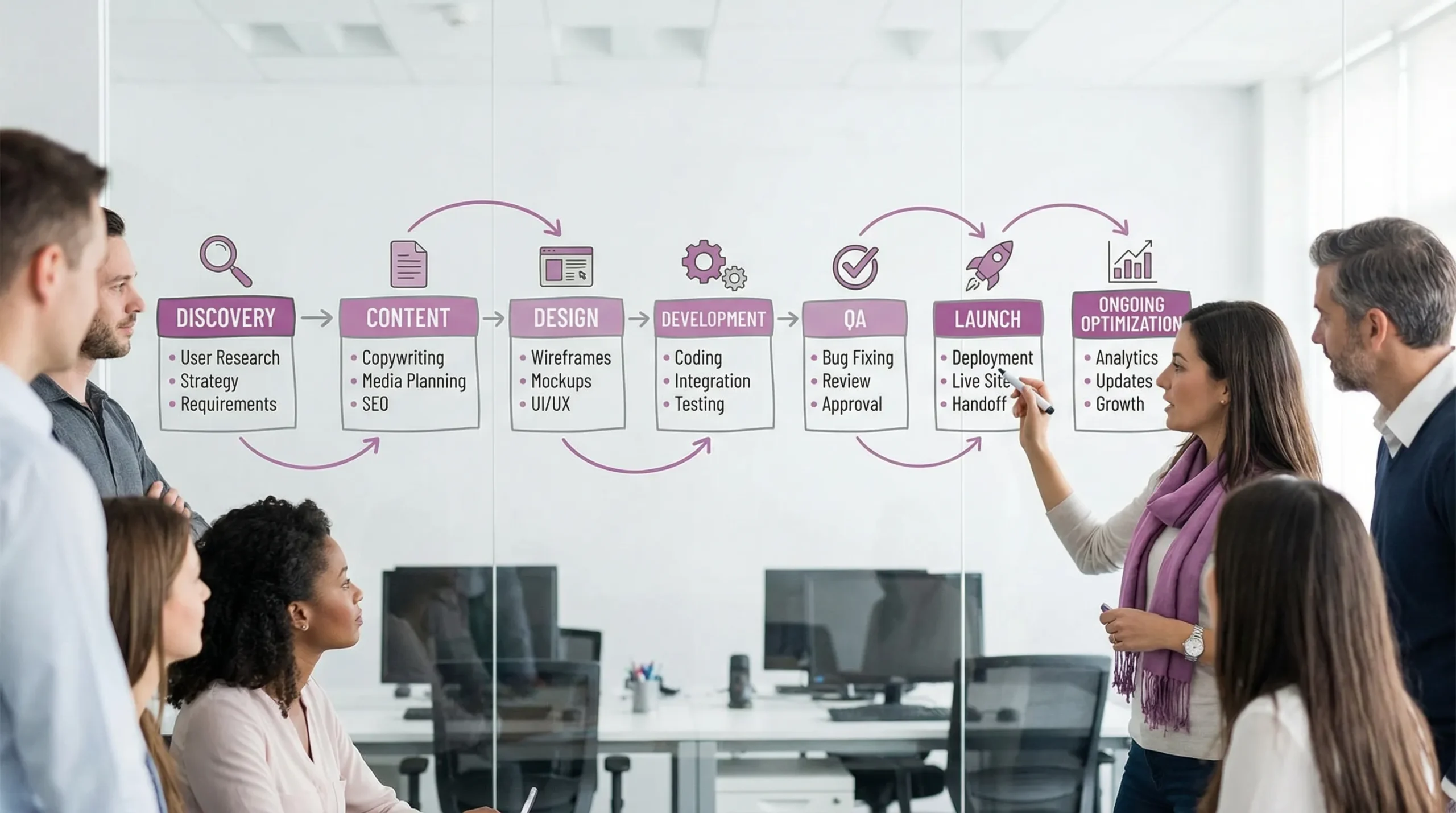
The typical website creation process (phase by phase)
A professional build usually follows a predictable set of phases. You don’t need a huge agency process, but you do want structure.
1) Discovery and goals (what success means)
You should expect a kickoff call where the team asks about:
- Your best services or products (and what you want to sell more of)
- Your service area (neighborhoods, cities, radius)
- Your “ideal customer” and common objections
- Competitors you respect (and ones you don’t)
- How leads come in today (calls, Yelp, Google Business Profile, referrals)
- Your capacity (if you can only handle 20 leads a week, the site should qualify leads)
A good outcome of discovery is a short plan that aligns the website to business reality, not generic marketing talk.
2) Sitemap and user journeys (what pages you need)
A solid website creation service will translate discovery into a page plan. For many local businesses, the core is simple:
- Homepage (clear offer + trust + fast path to contact)
- Service pages (one per core service)
- Location or service-area coverage (when relevant)
- About (credibility, team, story)
- Contact (forms, map, hours, call tracking options)
- FAQs (sales enablement and SEO)
If you are not sure what platform fits your situation, this guide breaks it down clearly: Best website platform for local businesses.
3) Content and messaging (the part that can make or break the timeline)
Most website delays come from content. Expect your provider to either:
- Interview you and produce draft copy, or
- Give you templates and guidance, then edit what you write
Either way, you should also expect a content checklist (photos, logos, reviews, service details, FAQs). If a vendor says “we’ll handle content” but has no process for pulling information out of you, that’s a warning sign.
4) Design (structure first, then visuals)
Design should start with layout and usability, then move into visuals. For small businesses, the biggest “design wins” are usually:
- Clear hierarchy (people instantly understand what you do)
- Scannable sections and readable typography
- Mobile-first navigation (thumb-friendly)
- Strong calls to action (call, book, request quote)
You should see at least one design round that focuses on structure before polishing colors and imagery.
5) Development (building the site to be fast, editable, and secure)
Development is where a lot of “invisible quality” lives. At minimum, expect:
- Responsive build across common devices
- Clean technical setup (no broken templates, no plugin overload)
- Basic security hardening and spam protection
- Editable page templates (so updates are not a rebuild)
If performance is a priority (it should be), ask how the team approaches Core Web Vitals. Google’s overview is a good baseline reference: Core Web Vitals.
6) SEO foundation and local optimization
For local businesses, “SEO” is not just blog posts. Website creation services should typically include on-page fundamentals such as:
- Clean URL structure and page titles
- Indexing controls (no accidental “noindex”)
- Internal linking that reflects your main services
- Local trust signals (address consistency, service area, reviews)
- Basic schema markup (often Organization/LocalBusiness)
If your customers are within a geographic radius, local optimization matters as much as design. The goal is to make it easy for Google (and humans) to trust you.
7) Integrations (forms, CRM, scheduling, payments)
Modern websites are rarely standalone. Expect a good provider to ask where leads should go and what should happen next.
Common integrations include:
- Contact forms to email and/or CRM
- Call tracking
- Booking tools
- Quote request workflows
- Newsletter signup
- Payment links or full checkout
For some industries, integrations are the product. For example, travel businesses that sell trips across borders may need eVisa workflows built into their customer experience. In those cases, integrating an eVisa provider like SimpleVisa can be part of your “website creation” scope, especially if you need API or white-label support.
8) QA, launch, and handoff
A professional launch is more than pressing “publish.” Expect checks for:
- Mobile and desktop testing
- Form and conversion tracking tests
- Redirects (if replacing an old site)
- SSL, DNS, and domain configuration
- Basic accessibility checks
Accessibility is also increasingly a business risk topic, especially for public-facing sites. If you want a credible standard to reference in discussions, WCAG is the most widely used: WCAG 2.2.
A practical deliverables checklist (what you should receive)
Use this as a quick way to compare providers offering “website creation services.”
| Area | What you should expect | Why it matters |
|---|---|---|
| Strategy | Goals, target actions, page plan | Prevents a pretty site that doesn’t convert |
| Content | Copy support process + content checklist | Avoids delays and generic messaging |
| Design | Mobile-first layouts, clear CTAs, brand alignment | Impacts trust and lead flow |
| Build quality | Fast pages, clean templates, secure setup | Affects rankings, usability, and maintenance |
| Local SEO basics | Titles, metadata, indexation checks, local trust signals | Helps you show up for local intent |
| Integrations | Forms routed correctly, tracking, CRM or booking links | Stops leads from falling through cracks |
| Analytics | GA4 and/or other tracking, key events defined | Lets you measure ROI |
| Ownership | Documented access to domain, hosting, CMS, accounts | Protects you from lock-in |
| Launch support | DNS, SSL, testing, redirects | Avoids downtime and lost rankings |
| Handoff | Simple training or documentation | Helps you stay independent |
What you’ll need to provide (so the project doesn’t stall)
Even fully managed website creation services require inputs from you. Plan to provide:
- Your service list and approximate pricing approach (even if “starting at”)
- Your service area (cities, neighborhoods, radius)
- Brand basics (logo, colors if you have them)
- Photos (team, work, storefront, before/after)
- Access to domain registrar and hosting (or permission to set it up)
- Your preferred contact flow (call, text, form, booking)
- Real FAQs you hear from customers
If you are a non-technical founder, ask your provider to translate these inputs into a simple shared document. The best teams reduce the “back and forth” burden.
Timeline expectations (and what changes them)
There’s no single timeline that fits every business, but you can set realistic expectations based on scope and content readiness.
| Website type | Typical timeline range | What usually slows it down |
|---|---|---|
| Simple brochure site (5 to 7 pages) | 2 to 4 weeks | Missing content, slow feedback cycles |
| Lead-gen site with integrations | 4 to 8 weeks | CRM complexity, tracking requirements, approvals |
| E-commerce or custom functionality | 6 to 12+ weeks | Product data cleanup, shipping/tax rules, custom features |
Two practical ways to speed up a project without sacrificing quality:
- Decide who approves what (one decision-maker, not five)
- Provide content early, even in rough form (drafts beat blanks)
Ownership and access (protect yourself from lock-in)
This is one of the most overlooked parts of website creation services.
At a minimum, you should know and control:
- Domain registrar login (where your domain is purchased)
- Hosting account access (or clear documentation if managed)
- CMS admin access
- Key third-party accounts (analytics, form tools, email marketing)
If a provider refuses to give access, or registers the domain in their name, treat that as a serious red flag.
Red flags when shopping for website creation services
A few warning signs that often lead to disappointing outcomes:
- No discovery process, they jump straight to design
- No discussion of local SEO fundamentals for a local business
- Vague answers about who owns what (domain, hosting, accounts)
- No plan for analytics or conversion tracking
- They promise “#1 on Google” without talking about competition and time
- They can’t explain what happens after launch (support, updates, fixes)
What “good” looks like after launch
A website is not finished at launch, it’s operational.
In the first 30 to 90 days, a good team will typically help you:
- Confirm leads are captured correctly (and follow-ups work)
- Monitor search impressions and early keyword traction
- Improve underperforming pages based on real data
- Tighten CTAs, forms, and mobile UX based on behavior
If you prefer a subscription-style approach that bundles updates and support, you may also want to compare a WaaS model: Web Design as a Service: Pricing and Plans.
Frequently Asked Questions
What’s the difference between website creation services and web design services? Website creation services usually include planning, content coordination, development, integrations, launch, and basic SEO, not only visual design.
How do I know if a website creation quote is missing important items? Ask what’s included for content, local SEO, analytics, integrations, and launch (DNS/SSL/redirects). If any of those are “not included,” you may face surprise add-ons.
Do website creation services include SEO? Most include SEO foundations (technical setup and on-page basics). Ongoing SEO (content publishing, link acquisition, competitive tracking) is usually a separate monthly effort.
Who should own the domain and hosting? You should own the domain and have admin access to hosting and key accounts. Your provider can manage them, but ownership and access should remain with you.
How long should a small business website take to build? Many small sites take 2 to 8 weeks depending on scope and how quickly content and approvals are provided. E-commerce and custom builds often take longer.
Need website creation services in Los Angeles or the Inland Empire?
Brother Web Design builds custom websites and digital systems for small businesses and non-technical founders, including local optimization, integrations, and ongoing support. If you want a clear scope, a realistic timeline, and a site built to generate leads (not just sit online), start with a quick conversation through the contact options at brotherwebdesign.com.