
Most small businesses don’t lose leads because they “need more marketing.” They lose leads because contact info lives in too many places: inboxes, call logs, sticky notes, DMs, spreadsheets, and someone’s memory. Good CRM contact management fixes that by creating one reliable home for every person who could buy from you, along with the context you need to follow up at the right time.
This guide breaks down how to structure your contacts, keep data clean, and make sure no lead slips through the cracks, even if you’re not technical and your team is small.
What “CRM contact management” really means (and what it’s not)
CRM contact management is the system for:
- Capturing new contacts from every channel (website, calls, walk-ins, referrals, ads, social)
- Storing them in a single source of truth
- Tracking conversation history and next steps
- Segmenting contacts so follow-ups are relevant
- Assigning ownership so everyone knows who is handling what
It’s not just a digital address book. A contact record should answer: Who is this, what do they want, where did they come from, and what should we do next?
For local businesses in Los Angeles and the Inland Empire, contact management usually has a fast payoff because leads come in from many sources (Google Business Profile calls, Yelp, website forms, Instagram DMs, walk-ins), and speed-to-response directly impacts bookings and sales.
The 5 parts of a contact record you actually need
A CRM can hold hundreds of fields, but small teams win by standardizing the essentials.
1) Identity (who they are)
At minimum: name, email, phone. If you serve businesses, add company name.
2) Source (how they found you)
This is one of the most valuable fields because it tells you what’s working.
Examples:
- Google Business Profile
- Website form
- Yelp
- Referral
- Walk-in
- Event
3) Intent (what they want)
This can be a dropdown such as “Service interested in” or “Product category,” plus a short note.
4) Lifecycle stage (where they are in the journey)
Keep it simple:
- New lead
- Contacted
- Qualified
- Quote sent
- Won
- Lost
5) Next step (what happens next, and when)
If your CRM contact records don’t include a clear next action (call, text, email, appointment, quote follow-up), you’re back to guessing.
Here’s a practical “starter template” most local service businesses can use.
| Field | Type | Why it matters | Example |
|---|---|---|---|
| First & last name | Text | Basic identification | “Maria Lopez” |
| Phone | Phone | Fast follow-up (calls/SMS) | (626) 555-0199 |
| Quotes, receipts, nurturing | maria@email.com | ||
| Lead source | Dropdown | Track ROI, train team | “Google Business Profile” |
| Service/product interest | Dropdown | Segmentation and routing | “Kitchen remodel” |
| Lifecycle stage | Dropdown | Pipeline visibility | “Qualified” |
| Owner | User | Accountability | “James” |
| Last contact date | Date | Prevents ghosting leads | “Jan 10” |
| Next task + due date | Task | Keeps momentum | “Call tomorrow 9am” |
Capture every lead automatically (without making your process complicated)
Contact management breaks when staff has to remember to copy/paste leads manually. The goal is to make lead capture feel automatic.
Common capture points for small local businesses:
| Channel | How to capture into your CRM | Key detail to store |
|---|---|---|
| Website forms | Web-to-lead form integration | Page/form name (what they asked for) |
| Calls | Call tracking or logging calls | Missed call flag + callback task |
| SMS | Two-way texting integration | Conversation history |
| Google Business Profile | Manual entry or integration | GBP as source |
| Yelp | Manual entry or integration | Yelp as source |
| Walk-ins | Quick intake form on phone/tablet | Consent for SMS/email |
| Referrals | Simple “referred by” field | Referrer name |
If you’re actively looking for conversations that turn into leads (especially for niche services), tools like Redditor AI are built to find relevant threads and help you engage consistently. If you go that route, make sure those inbound conversations still land in your CRM with a clear source tag so they don’t disappear into a social inbox.
The hidden enemy: duplicates (and how to prevent them)
Duplicates are more than annoying. They cause real revenue problems:
- Two people follow up with the same lead (looks disorganized)
- Nobody follows up because each person assumes the other is handling it
- Reporting becomes meaningless (inflated lead counts)
Simple duplicate prevention rules
Use these as internal “CRM hygiene” rules:
- Phone number is primary for consumers (most reliable unique identifier)
- Email is primary for B2B (often more reliable than phone)
- Require at least one unique field (phone or email) before saving a lead
- Standardize formatting (e.g., (###) ###-####) so the CRM can match records
Deduping cadence that works for small teams
If you don’t have a data admin, you still need a routine:
- Weekly: review new leads for obvious duplicates
- Monthly: run a duplicate check and merge
- Quarterly: clean up sources, stages, and dead fields you aren’t using
Tags, segments, and lists: how to stay organized without overbuilding
Most founders either underuse tags (everything is “New Lead”) or overdo it (50 tags nobody understands). A good rule is: tags describe long-term attributes, stages describe where they are in the sales process.
Examples of useful tags
- Neighborhood/area served (for local routing)
- VIP / repeat customer
- Spanish-speaking
- Commercial vs residential
- High intent (requested quote, ready to book)
Segments you should be able to pull in seconds
- Leads not contacted within 1 business day
- Quotes sent but no response in 3 days
- Past customers who haven’t booked in 6 months
- Leads from a specific source (e.g., Yelp) this month
If your CRM contact management can’t produce these lists quickly, you will feel like you’re “working hard” but not moving leads.
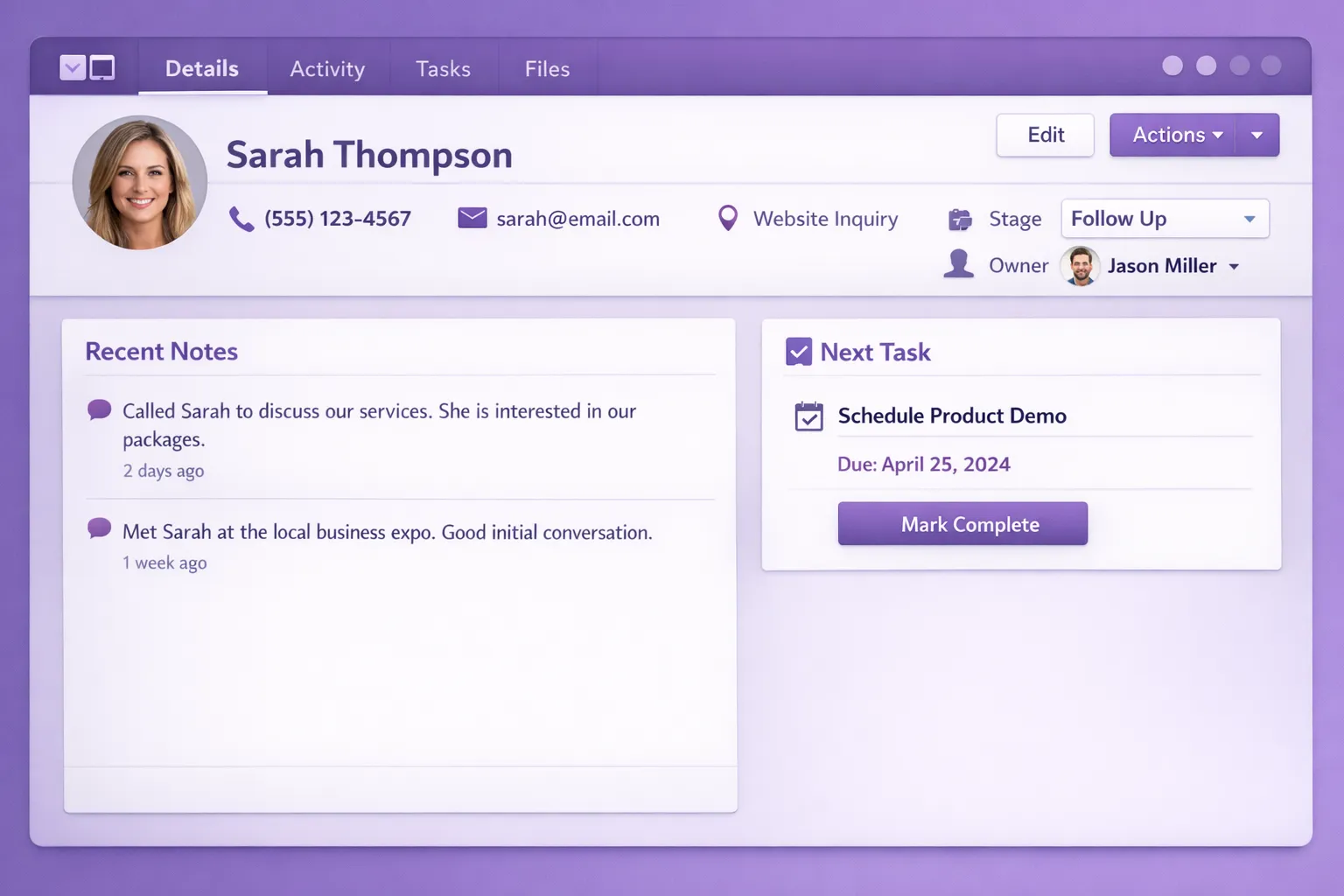
Build a “single timeline” for every contact
The most practical upgrade you can make is ensuring every contact record shows a single chronological timeline:
- Form submission details
- Calls (answered, missed, duration)
- Emails (sent, opened if available)
- Text messages
- Notes from the team
- Quotes/invoices (if connected)
Why it matters: when a lead calls back two weeks later, you should not have to search inboxes or ask “What was this about again?” The timeline makes your follow-up confident and fast.
Ownership rules: who follows up, and when
A CRM only keeps leads organized if your team shares the same rules for ownership.
A simple ownership model for small teams
- One contact, one owner at any given time
- Ownership is set automatically on capture when possible (round robin or based on service type)
- If a lead is reassigned, the next task must move with it
Response-time standards (realistic and effective)
For most local service businesses, these two standards improve conversion quickly:
- New lead response target: within 15 minutes during business hours
- Missed call follow-up: text back immediately, call back within 30 minutes
Even if you can’t hit these perfectly, a CRM helps you measure them, and what gets measured gets fixed.
Contact management automation that doesn’t feel “robotic”
Automation is helpful when it supports your team’s habits, not when it tries to replace them.
High-impact automations tied to contact records:
- Create a task when a new lead comes in (no lead sits unassigned)
- Auto-send a short “we got your request” message (sets expectation)
- If a quote is sent, create a follow-up task for 48 to 72 hours later
- If no reply after X days, move stage to “Stale” and trigger a re-engagement task
Keep messaging human. The CRM’s job is to trigger the right next step, not to spam people.
Common CRM contact management mistakes (and quick fixes)
Mistake 1: Treating the CRM like storage, not a workflow
If contacts enter the CRM but no next action is scheduled, leads still slip.
Fix: require a “Next task + due date” for any lead in an active stage.
Mistake 2: Letting everyone create their own fields and tags
This is how you end up with “Instagram,” “IG,” “Insta,” and “Social” as four different sources.
Fix: lock down key dropdown fields (source, stage, service type) and keep tags limited.
Mistake 3: No definition of a “qualified lead”
Teams argue about lead quality because there’s no standard.
Fix: write a one-sentence rule (example: “Qualified means they want service in our area, within 30 days, and they shared phone or email”).
Mistake 4: Not capturing consent for texting and email
In California, you want to be especially careful about privacy expectations and consent for marketing messages.
Fix: store opt-in status, and keep intake language clear on forms and in-person collection.
A practical contact management setup for LA-area local businesses
If you want a clean, scalable setup without a long project, aim for this structure:
One pipeline per revenue motion
Examples:
- “New Service Leads” pipeline
- “Estimates and Quotes” pipeline
- “Partnerships / B2B” pipeline
Do not create a new pipeline for every small variation. That makes reporting hard.
One intake form per high-intent action
Examples:
- “Request a quote”
- “Book a consultation”
- “Schedule a call back”
Each form can automatically set:
- Lead source = Website
- Service interest = selected value
- Stage = New lead
One weekly review rhythm
Pick a consistent time:
- Review uncontacted leads
- Review quotes awaiting response
- Review stale leads to re-engage or close out
This meeting can be 15 minutes. The point is consistency.
When you should consider customizing your CRM contact management
Out-of-the-box CRMs are often enough at first, but you may outgrow them when:
- You need custom fields and workflows tied to how your operations actually run
- You want leads routed by service area, job type, or schedule availability
- You need deeper integrations (quotes, invoicing, inventory, dispatch)
- You want cleaner reporting by source, location, or campaign without manual work
That’s where a local dev team can help you design the data model, automate capture, and build integrations that keep contact records consistent.
Need help getting your leads organized (without adding busywork)?
Brother Web Design helps small businesses and non-technical founders implement CRM contact management that actually gets used. That can include connecting your website forms to your CRM, setting up lead routing, cleaning up duplicates, and building automations that create tasks and follow-ups automatically.
If you want, you can start with a quick audit of where leads are coming from today (website, calls, referrals, social, walk-ins) and identify the simplest path to getting every lead into one organized system. For more on CRM fundamentals, you may also like our guide on CRM software features small teams really need.