

If you run a small team, the right CRM should make your workday calmer and more predictable, not heavier. In 2026, you do not need a behemoth platform with hundreds of toggles. You need a clean system your team will actually use, that shows you where every lead is, reminds you to follow up, and connects to the tools you already rely on. This guide breaks down the CRM features that deliver outsized value for small local businesses in Los Angeles and the Inland Empire, and which extras you can safely skip on day one.

What a CRM should do for a 2 to 20 person team
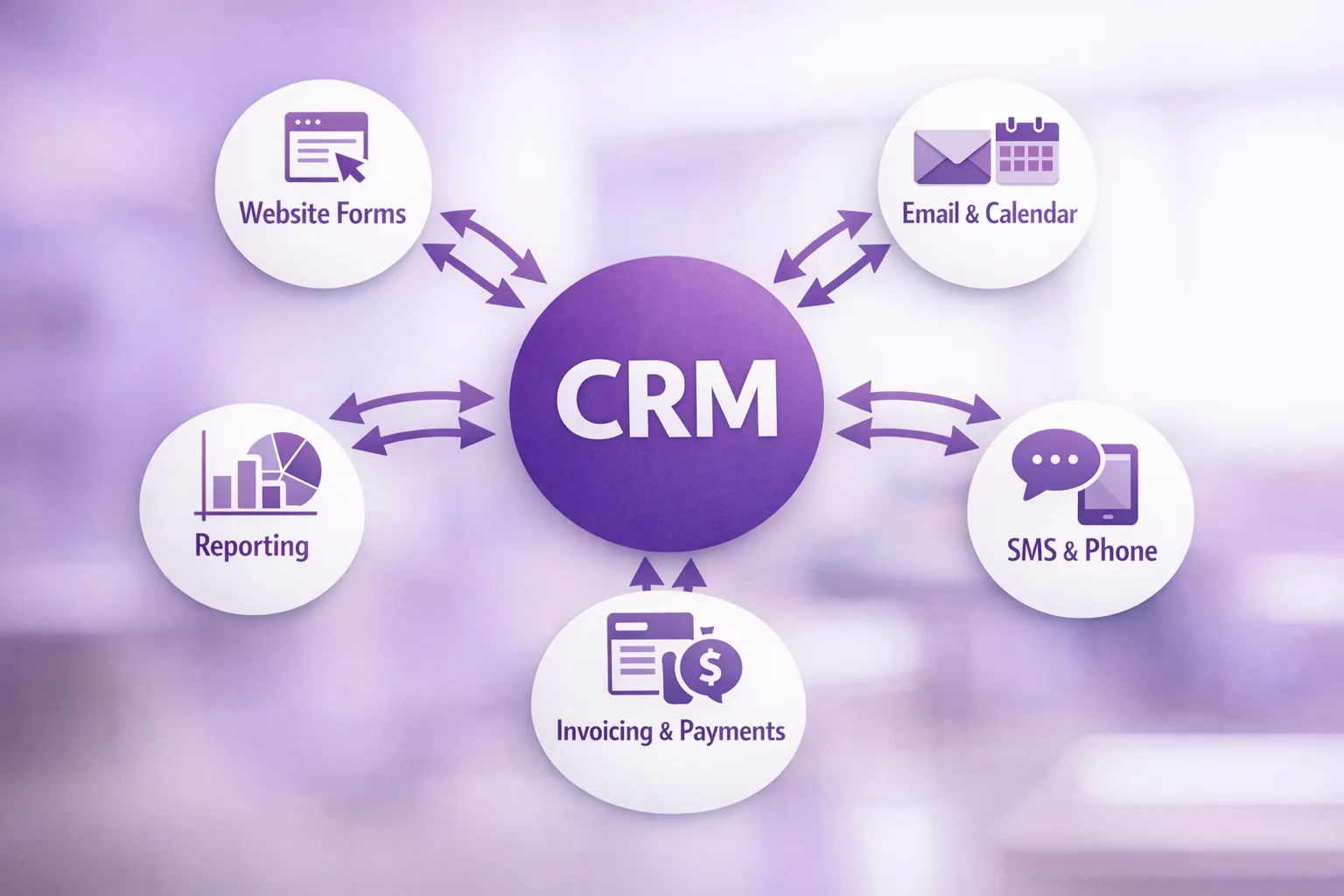
At its core, your CRM should help you capture leads fast, see the status of every deal at a glance, and keep follow ups on time without micromanagement. It should centralize conversations, proposals, and tasks so nothing depends on memory. Finally, it should integrate with your website, your email or calendar, and your invoicing or payments so you spend less time copying and pasting.
Must-have CRM features for small teams
Contact and activity timeline
Every customer and prospect needs a single profile with the basics you actually use, for example phone, email, service address, and a notes field. The activity timeline should show emails, calls, texts, form fills, and tasks in order. When someone calls in or replies to a text, your team should immediately see the last touch and the next step.
Simple pipeline with stages you name
You do not need complex forecasting out of the gate. You do need a visual pipeline with clear stages, for example New Lead, Qualified, Proposal, Won or Lost. Drag and drop is helpful, and probability by stage can be enough to estimate near term revenue. You should be able to filter by owner and sort by oldest next action so cold deals do not quietly age out.
Tasks, reminders, and ownership
If a CRM does nothing else, it should tell each teammate what to do next and by when. Look for tasks that tie to a contact or deal, with due dates, priority, and a single owner. Overdue badges and daily digest emails are simple but powerful. Avoid systems that bury tasks under three clicks or make it hard to change owners when someone is out.
Email and calendar integration
Your team lives in Gmail or Outlook. Email sync and calendar integration reduce double work. From the CRM, you should be able to send tracked emails, log replies automatically, and schedule follow ups. Calendar integration prevents double booking and keeps consultations, estimates, or site visits visible to the whole team.
Web to lead capture that works
Leads should not get stuck in an inbox. Your website forms, landing pages, and chat should send submissions straight into your CRM with source tracking. If you run ads with lead forms, make sure those flow in as well. Capturing leads directly from your website and listings like your Google Business Profile helps you respond in minutes, not days.
Two way SMS and call logging
For service businesses, texts get answered more often than emails. Two way SMS from inside the CRM keeps conversations tied to the customer record. Automated text confirmations for appointments reduce no shows. If you use VoIP, call logging and click to call save time and preserve context.
Quotes, invoices, and payments or easy integrations
You do not need a full accounting suite in your CRM. You do need to create professional quotes fast, get signatures, and collect deposits or payments. If your CRM does not handle this natively, look for clean integrations with tools you already trust, for example QuickBooks Online or Stripe.
Light automation for speed, not complexity
The best small team automation is boring and reliable. Examples include assigning new web leads, sending an instant thank you email or text, creating a follow up task two days after a missed call, and moving a deal to Proposal when a quote is sent. A simple “if this then that” builder is enough to start.
Reporting you will check weekly
Dashboards should answer a few practical questions. How many new leads came in, how fast did we respond, what is in the pipeline by stage, and what did we close this week. Exports are handy, but the most important part is a shared view your team actually looks at every Monday.
Roles, permissions, and data hygiene
Even small teams need guardrails. Make sure you can limit who deletes records, exports data, or changes pipelines. Imports and deduplication tools matter when you migrate from spreadsheets. A recycle bin or restore option will save you when someone misclicks.
Mobile that is truly usable
A clean mobile app or responsive web view keeps field teams productive. You should be able to search contacts, log notes, update deal stages, and send texts from the road. Offline capture for weak signal areas is a plus.
Quick reference, the features that pay off fast
| Feature | Why it matters | Day one test |
|---|---|---|
| Contact timeline | Context for every conversation | Open a contact and see last email, last call, next task |
| Pipeline board | Focus on what moves revenue | Drag a deal between stages and set next step |
| Tasks and reminders | Prevents silent drop offs | Assign a task, change owner, mark complete |
| Email and calendar sync | Cuts double entry | Send an email from CRM, see it on the contact |
| Web to lead | Faster speed to lead | Submit a test form, see it create a contact and task |
| SMS and call logging | Higher response rates | Text a test contact from the CRM, check the thread |
| Quotes and payments | Shorter time to cash | Generate a quote and send a payment link |
| Light automation | Consistent follow ups | Create a rule that assigns new leads and creates a task |
| Simple dashboards | Shared visibility | Check new leads, response time, and pipeline in one view |
Nice to have, but not required on day one
Many platforms will pitch advanced features that sound impressive but often slow adoption for small teams.
- Predictive scoring and complex AI forecasting
- Territory management with hierarchies and approvals
- Heavy marketing automation with multi step journeys
- Deep CPQ or multi layer price catalogs if you sell a small menu of services
- Custom SLA timers and case escalations for support teams you do not have yet
These can be valuable later. Start with a setup your team can master in a week, then layer complexity only when you feel specific pain.
Integrations that move the needle for local businesses
The most useful connections are usually the ones that replace copy and paste.
- Workspace and communication, Gmail or Outlook for email, Google Calendar or Outlook Calendar, your phone or SMS provider for logging and texting.
- Lead capture, your website forms, landing pages, and ads. A good CRM will capture source so you can see which channel and keyword created the lead. Capturing leads from your Google Business Profile inquiries can help you prioritize local intent.
- Money and paperwork, connect to QuickBooks Online if you invoice there, and use Stripe or your preferred processor for deposits and card on file.
- No code glue, tools like Zapier can bridge gaps and trigger automations without custom code. They are a good way to validate a workflow before you invest in a deeper integration.
Security and privacy basics for California businesses
Even micro teams handle sensitive customer data. Ask about encryption in transit and at rest, role based access, multi factor authentication, audit logs for exports and deletes, and regular backups with restore options. If you operate in California and meet certain thresholds, the California Privacy Rights Act may apply to how you collect and use personal information. The California Privacy Protection Agency publishes the current regulations and updates, see the CPRA regulations. This is not legal advice, but it is smart to choose a CRM that supports data access, correction, and deletion requests.
A 30 day implementation plan that works
Rushing a CRM rollout leads to low adoption. A focused, one month plan is usually enough for a small team.
Week 1, map your process and fields
List your deal stages, define the one or two must have fields for each stage, and nominate an owner for every type of lead. Clean your spreadsheet contacts and tag obvious duplicates. Decide on naming conventions for deals and files.
Week 2, connect the pipes
Integrate email and calendar, build your main web form, and set up a basic online booking flow if you offer consultations or estimates. Create email and text templates for first touch, missed call, and appointment reminder. Load your price list if you quote from the CRM.
Week 3, automate the boring parts
Create three to five automations that cover the 80 percent, new web lead assignment with a task and a thank you text, a follow up task if no reply after two days, move a deal to Qualified when a call is completed, and send a reminder the day before an appointment.
Week 4, train, test, and go live
Run a pilot with two to three users for four days. Fix field names, simplify screens, and remove anything not used. Hold a one hour training, then go live. The following Monday, look at the dashboard together and agree on two metrics to improve, speed to lead and number of overdue tasks.
Real world tips for adoption
- Remove friction, hide fields no one fills and shorten forms on mobile.
- Measure what matters, speed to first response and tasks completed are stronger leading indicators than revenue alone.
- Keep a tidy database, schedule a 20 minute weekly cleanup, merge duplicates and close dead deals.
- Make it visible, a TV dashboard or shared screen in your daily standup keeps the team aligned.
Build, buy, or customize
Most small teams start with an off the shelf CRM, then customize. That is often the right path. If your business has a unique workflow, complex scheduling, or needs to integrate tightly with your website, quoting, and fulfillment processes, a custom layer can remove hours per week of busy work.
- Off the shelf is a strong fit if you need standard contact management, a basic pipeline, and email or calendar sync.
- Customize when you need special fields and screens for your trade, automatic creation of jobs or tickets from deals, or connections to niche tools your industry relies on.
- Consider a phased approach, keep your first month simple, then add automations, text templates, and deeper integrations in month two or three when your team is comfortable.
How Brother Web Design can help
Brother Web Design is a local, in house team serving Los Angeles and the Inland Empire. We help small businesses and non technical founders get a CRM that fits the way they work, not the other way around.
- CRM development and customization, build fields, screens, and workflows around your process.
- Workflow automation, reduce manual follow ups with rules that assign, remind, and progress deals.
- Lead capture and local SEO, connect website forms and landing pages, and align with how customers find you in your area.
- E commerce and payments, integrate your website, quotes, and checkout so cash flow is faster and cleaner.
- Ongoing support, training, and maintenance, keep your system stable as you grow.
If you are ready to simplify your sales process and get a CRM your team will use every day, get in touch with the team at Brother Web Design. We will help you prioritize the features that matter, connect your existing tools, and launch a system that starts paying for itself in weeks, not months.
Your quick evaluation checklist
Use these questions during demos and trials. If a vendor gives short or vague answers, that is a red flag.
- How quickly can new web leads create a contact, a task, and an alert for the right owner.
- Can I change pipeline stages and fields without a developer.
- Do emails and calendar events sync both ways, and can I send tracked emails from inside the CRM.
- Is two way SMS available, and are conversations saved on the contact timeline.
- Can I generate a quote in under two minutes, and connect to my existing payment processor.
- What automations come out of the box that match our process, assign, follow up, and appointment reminders.
- Which dashboards are ready on day one, new leads, response time, pipeline by stage, and closed won.
- What controls do I have over user permissions, deletions, and exports, and how do I restore deleted data.
Pick the platform that your team understands in a single training session. Then let it earn trust by catching dropped balls and making follow ups effortless. When the basics are automatic, your team gets time back to do the human work that wins business.





1 Comment. Leave new
[…] If you want, you can start with a quick audit of where leads are coming from today (website, calls, referrals, social, walk-ins) and identify the simplest path to getting every lead into one organized system. For more on CRM fundamentals, you may also like our guide on CRM software features small teams really need. […]