
Choosing CRM software is one of those decisions that looks simple on a comparison page, then gets expensive when the wrong system slows down your follow up, confuses your team, or traps your data.
For small businesses, the goal is not to buy the biggest CRM. It is to pick the one that your team will actually use, and that can grow with you without rebuilding everything in a year.
Below are the top CRM software features small businesses should seek, plus practical ways to evaluate them during demos, trials, and implementation.
What “good CRM software for small businesses” really means
A CRM (customer relationship management) system should do three jobs well:
- Keep your customer and lead data clean and accessible.
- Make follow up easier than forgetting.
- Show you what is working so you can repeat it.
Many CRMs technically do all three, but small businesses have a different reality than enterprise teams: fewer admins, less time for training, and a bigger penalty when something breaks.
So when you evaluate CRM software for small businesses, prioritize features that reduce manual work, reduce mistakes, and keep adoption high.
The baseline features you should not compromise on
Most CRMs include “standard” tools like contacts, pipelines, tasks, and reporting. The question is whether those basics are fast, intuitive, and connected to how your business actually operates.
If a CRM makes it hard to log an interaction, update a deal, or find the latest conversation, it will not matter how many advanced features it has.
A quick way to sanity check the basics is to run through your last 10 leads and ask: could we recreate the full story (source, response time, quotes, follow ups, outcome) in under 30 seconds per lead?
Top features to seek (the ones that separate “nice” from “usable”)
The sections below focus on differentiators, the features that most often determine whether a CRM succeeds or becomes shelfware.
1) Flexible data model (custom fields that stay sane)
Small businesses rarely fit a generic template. A home services company cares about job type, property address, and appointment windows. A wholesaler cares about MOQ, terms, and rep assignments.
Look for:
- Custom fields (text, dropdown, multi select, date) on contacts, companies, and deals
- Validation rules or required fields (so your team stops entering “N/A” everywhere)
- Clear field governance (who can create fields, rename them, and retire old ones)
If you cannot model your real world data without hacks, your reporting and automation will always be shaky.
2) Lead capture that works even when you are busy
The best CRM is the one that captures leads automatically while you are on calls, on job sites, or working the floor.
Seek out:
- Website forms that create leads directly (and tag the source)
- Call tracking or missed call workflows (at least basic logging)
- Import tools that do not destroy your data when you upload a spreadsheet
For local businesses in Los Angeles and the Inland Empire, this matters because lead volume often spikes unpredictably (seasonal demand, local ads, referrals), and manual entry is usually the first thing to break.
3) Real automation (simple triggers, not a science project)
Automation should reduce repetitive work, not create a second job maintaining “workflows.”
Good small business automation usually looks like:
- Lead assigned to the right person
- Follow up sequence created automatically
- Reminders if there is no reply after X days
- Status change triggers the next step (estimate sent, booked, won, lost)
When evaluating, ask to see how the CRM handles exceptions, for example “if lead is VIP, do not auto send message” or “if deal is marked lost, require a reason.” Those details separate robust systems from brittle ones.
4) Communication logging that builds a real timeline
Small teams feel “busy” when the truth is “uncoordinated.” Your CRM should create a single place to see what happened without digging through inboxes.
Look for:
- Two way email sync that logs sent and received messages
- Two way texting (if your customers prefer SMS)
- Notes and call logs that are easy to enter from mobile
If you operate in an industry where vendors and production partners are part of customer delivery (apparel, signage, fabrication, events), timeline clarity is crucial. For example, brands working with a full service manufacturing partner like Arcus Apparel Group often need crystal clear visibility into customer requirements, sample approvals, and production updates, and your CRM should support that level of tracking even if your “team” is only a few people.
5) Integration depth (not just a logo on an app marketplace)
Most CRMs advertise integrations. What you need to verify is whether the integration is “surface level” or operational.
Examples of integration depth that matter:
- Your forms send source + campaign data, not just name and email
- Your accounting tool syncs customers and invoices, not just contacts
- Your calendar integration supports round robin booking or at least prevents double booking
If you already use tools like Google Workspace or Microsoft 365, your CRM should fit into those workflows without constant tab switching.
6) Reporting that answers business questions (not vanity charts)
Small business reporting needs to be straightforward and action oriented. During demos, ignore dashboards until you verify the building blocks.
A CRM is report ready when it can reliably answer:
- Where do leads come from?
- How fast do we respond?
- What is our win rate by service or product line?
- What is our average time to close?
- What is our revenue forecast based on open deals?
To make this concrete, here is a feature to question mapping you can use in trials.
| Business question | CRM feature you need | What to test in the trial |
|---|---|---|
| “Which marketing is driving revenue?” | Source tracking and attribution fields | Create 5 test leads from different sources and confirm tags flow through to reports |
| “Who is dropping the ball on follow up?” | Tasks, SLAs, reminders | Assign leads to 2 reps, then check overdue tasks and notifications |
| “Where do deals get stuck?” | Stage history and timestamps | Move a deal through stages and verify the CRM records stage duration |
| “What should we work on today?” | Views, filters, saved lists | Can each role save a view like “Hot leads, no activity in 48 hours” |
7) Permissions, auditability, and basic security controls
Even a small company needs boundaries. This is especially true if you have contractors, part time sales reps, or multiple locations.
Look for:
- Role based permissions (who can export data, delete records, see revenue)
- Audit logs (who changed what)
- Two factor authentication and SSO options (if available)
If you do business in California, also consider privacy obligations under CCPA and CPRA. Your CRM should make it reasonable to find, export, or delete customer data when required. The California Department of Justice CCPA page is a helpful reference for what consumers can request.
8) Mobile experience that is actually usable on the go
Many CRMs claim “mobile friendly.” What matters is whether a rep can complete core actions quickly:
- Add a lead
- Log a call
- Update a deal stage
- Create a task and set a reminder
- Pull up the latest notes before walking into a meeting
If your team works in the field (contractors, med spa operators, event services, mobile detailers), mobile usability is not a bonus feature. It is the product.
9) Easy customization without breaking upgrades
Some CRM platforms allow deep customization, but can become fragile if every change requires a developer.
A healthy middle ground for most small businesses is:
- Custom fields and basic objects
- Simple automation builder
- Templates for emails, texts, and quotes
- API access or webhook support (even if you do not use it today)
This protects you when you want to add website upgrades, lead routing, or workflow automation later.
10) Data portability (you can leave without losing everything)
This is a feature buyers forget until it is painful.
Before you commit, confirm:
- You can export contacts, companies, deals, activities, and notes
- Exports are in a usable format (CSV is common, but verify what is included)
- Attachments and email logs can be retained or archived
Vendor lock in is a real cost for small businesses because switching later usually means downtime and cleanup.
Feature priorities by business type (quick guide)
Different local businesses should weight features differently. Here is a simple prioritization map.
| Business type | High priority CRM features | Why it matters |
|---|---|---|
| Home services (plumbing, HVAC, remodeling) | Mobile usability, missed call workflows, scheduling integrations | Leads are time sensitive, and much of the work happens away from a desk |
| Local retail and e-commerce | Customer segmentation, purchase history integration, marketing automation | Repeat customers and lifecycle messaging drive revenue |
| B2B services (agencies, consultants) | Deal stages, document templates, proposal tracking, pipeline forecasting | Sales cycles are longer and require consistent follow up |
| Wholesalers and distributors | Account hierarchy, permissions, quote and order workflow, reporting | Multiple contacts per account, pricing complexity, rep visibility |
Use this to focus your demos. If a feature is not high priority for your business model, it should not drive the decision.
How to evaluate a CRM in a demo (without getting sold)
CRMs can look amazing in a curated demo. You need to test real scenarios.
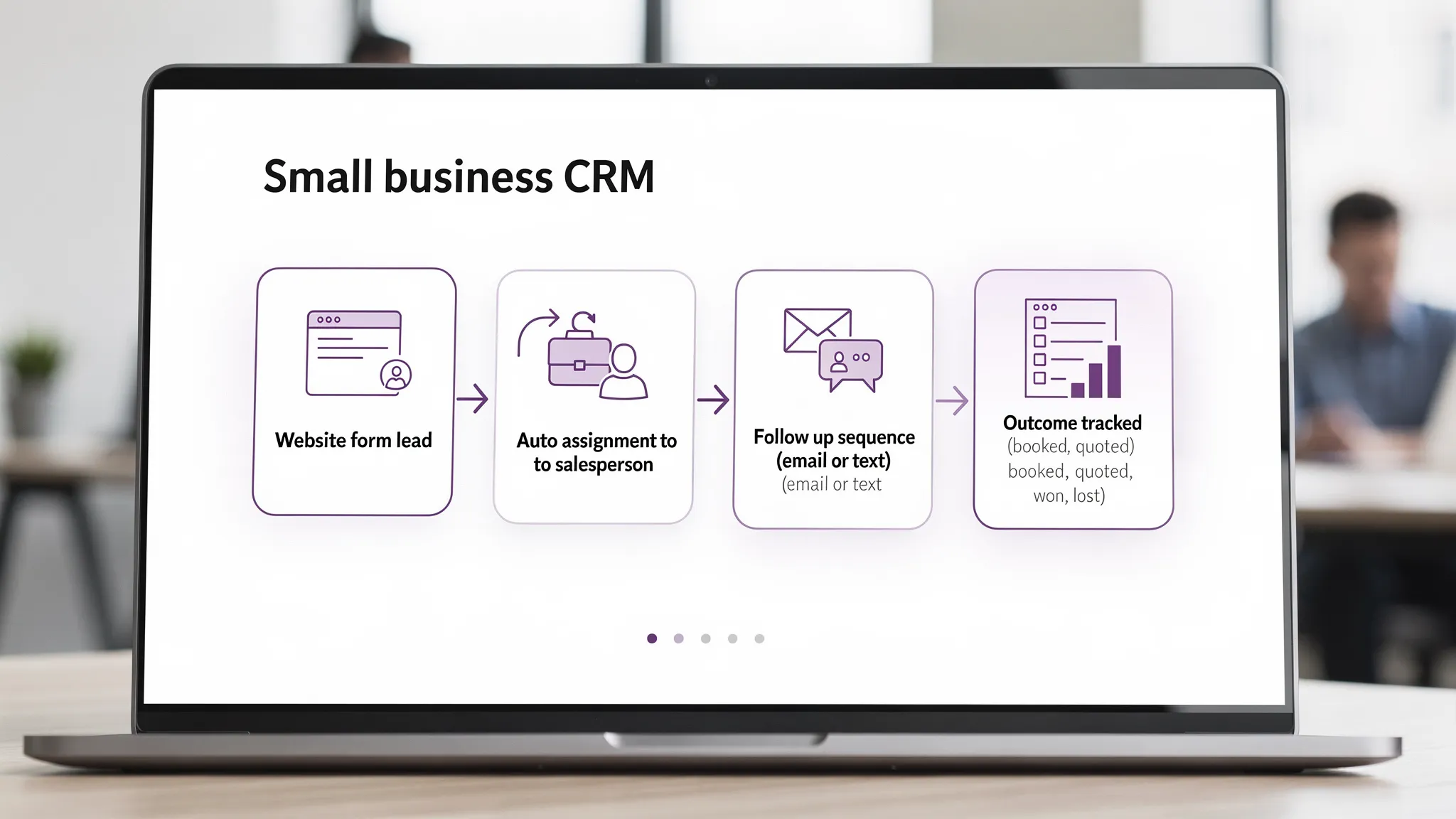
Ask the vendor or implementer to walk through your actual workflow with sample data:
- A lead comes in from your website
- The lead is assigned to the right person
- A follow up message is sent
- An appointment is booked or an estimate is sent
- The outcome is tracked and appears in reports
Then ask one question that reveals truth fast: “Show me where this breaks.” For example, what happens if a customer replies to a text message after hours, or if a lead submits the form twice.
Common CRM mistakes small businesses make (and how to avoid them)
The fastest way to waste money on CRM software for small businesses is to treat it like an app install instead of an operational change.
Here are the mistakes that show up most often:
- Buying for features you will not implement. If you are not going to set up lead capture, stages, and follow up rules in the first month, start simpler.
- No owner. Someone needs to be responsible for fields, stages, and basic data quality.
- Over customization early. Get the core workflow working first, then automate.
- Skipping tracking. If you do not track source and outcomes, you cannot improve marketing.
When to build on top of a CRM (or customize it)
You do not need custom development to get value from a CRM. But you might need it when:
- You have multiple lead sources that need routing rules
- You want a custom portal or specialized workflow (quotes, approvals, production steps)
- Your team is doing repetitive admin work that can be automated safely
- You need integrations that do not exist off the shelf, or that keep failing
This is where a local dev team can help you connect the CRM to your website, forms, scheduling, accounting, or internal tools without forcing your business to change how it operates.
Frequently Asked Questions
What is the most important feature in CRM software for small businesses? The most important feature is usually reliable lead capture and follow up, meaning your CRM can automatically create leads from your website and help your team respond consistently with tasks, reminders, and simple automation.
How do I know if my team will actually use a CRM? Run a trial where each user completes daily actions (add lead, log call, update stage, send message, create task) from both desktop and mobile. If it feels slow or confusing in week one, adoption will not improve later.
Do I need a CRM with marketing automation built in? Not always. Some businesses do fine with a CRM plus a lightweight email or SMS tool. A combined CRM and automation platform is most helpful when you need consistent follow up at scale, missed call text back, review requests, or nurturing sequences.
How long does it take to implement a CRM for a small business? A basic setup can be done quickly, but a successful implementation depends on data cleanup, defining your pipeline stages, connecting lead sources, and training. The timeline is usually driven more by process clarity than the software itself.
Can a CRM help with local SEO and lead tracking? Indirectly, yes. A CRM helps you track where leads come from (Google Business Profile, ads, referrals) and which sources turn into revenue. That data helps you invest in the channels that actually produce customers.
Want help choosing and implementing the right CRM?
If you are comparing CRM options and want a setup that matches your actual workflow (website lead capture, integrations, automation, reporting), Brother Web Design can help you plan, implement, and customize a CRM without overcomplicating it.
Explore your options at Brother Web Design and reach out when you are ready to map your pipeline and build a clean, reliable system your team will use.