
How to Optimize Your Website for What People Are Already Searching For
If you’ve ever wondered, “What should I write about on my website or blog?” the answer is easier than you think:
Your customers are already telling you.
And the best place to see exactly what people are typing into Google before landing on your site is inside your Google Search Console or Google Site Kit dashboard.
In this guide, I’ll walk you through step-by-step how to use real search data to create content your audience actually wants (and improve your SEO while you’re at it).
Step 1: Look at What People Have Searched for Recently
First, log in to Google Search Console or use Google Site Kit on your WordPress dashboard.
Then change the date filter to:
The last 7–14 days
This gives you fresh search intent data, meaning you’re seeing what people right now are typing before finding your website.
Now scroll to the section called:
“See how your content is doing.”
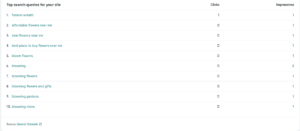
This table shows:
Search terms people used to find your site
Impressions
Clicks
Here’s what those mean in simple terms 👇
What Are Impressions?
An impression is when your website appears somewhere in Google search results — even if the user doesn’t click your site.
So if you see:
That means:
- One person searched “funeral wreath.”
- Your site appeared in their results
- They saw it (even if they didn’t click)
What Are Clicks?
A click means the person actually selected your website in the results.
So if you see:
That means:
- One person searched
- One person saw your site
- One person clicked your site
That’s excellent, because it shows your page is relevant for that keyword.
How to Read Search Intent (This Is Where the SEO Magic Happens)
Let’s compare two example search terms:
“funeral wreath”
This sounds like a general research keyword.
The user may be:
Learning what a funeral wreath is
Comparing options
Looking for images
Doing early research
They may be ready to buy, but they also might just be browsing.
“best place to buy flowers near me”
Now this is completely different.
This search shows:
✔️ The user already knows what they want
✔️ They are actively shopping
✔️ They are ready to purchase
✔️ They care about location
This is called high-intent search traffic, meaning the person is close to making a purchase.
These are the keywords you want to create content around.
So instead of guessing blog ideas, you can:
Turn searches into articles like:
“Best Place to Buy Flowers Near You: What to Look For”
“How to Choose the Right Local Flower Shop”
“Why Buying Flowers From Local Shops Matters”
You’re meeting the customer exactly where they already are.
Step 2: Study Your Top Content Over the Last 7 Days
Now scroll to the next section:
“Top content over the last 7 days”
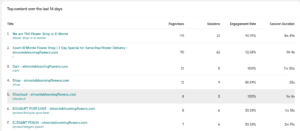
This table shows:
Pageviews
Sessions
Engagement Rate
Session Duration
Let’s break those down.
What Are Pageviews?
Pageviews = how many times a page was loaded
This even includes:
✔️ Refreshes
✔️ Returning users
✔️ Navigation reloads
One person can create multiple page views.
What Are Sessions?
Sessions = how many unique visits happened
So if one user browses your site for 5–10 minutes, visiting multiple pages, that counts as one session.
This number matters more than pageviews because it represents real users.
What Is Engagement Rate?
Engagement rate shows how many users interacted meaningfully with your page (not just bounced away).
Higher = better.
It means your page is relevant and useful.
What Is Session Duration?
This one tells a story.
Session Duration = how long the average visitor stays
Example:
If your Shop Page shows:
Average Session Duration: 9 minutes
That is AMAZING.
It means:
✔️ People are browsing
✔️ Comparing products
✔️ Actively shopping
So you can assume:
Your product page experience is working.
By contrast:
If your homepage has:
Session Duration: 5–15 seconds
That tells us:
Something on the homepage isn’t connecting.
Maybe:
Slow load time
Confusing layout
No clear CTA
Not enough trust
Poor first impression
This is how analytics becomes a story, not just numbers.
Step 3: Turn This Data Into Smart SEO Content Ideas
Here’s the formula:
Search Terms + Intent + Page Behavior = Content Strategy
So:
If people search
“best place to buy flowers near me”
And you see
They spend 9 minutes on your shop page
Then you should create content like:
- “Your Guide to Buying Flowers Locally What to Know Before You Order”
- “Top Reasons to Buy Flowers From a Local Florist Instead of a Chain”
- “How to Choose the Best Local Flower Shop Near You”
Because you already KNOW:
✔️ They want to buy
✔️ They are actively researching
✔️ They prefer local
You aren’t guessing anymore.
Why This Works (SEO + Psychology)
Google wants to rank content that:
- Matches what users search
- Keeps people engaged
- Provides helpful information
And using your search + content analytics allows you to:
- Understand buyer intent
- Write content that answers real questions
- Build trust
- Improve SEO naturally
- Increase conversions
This is data-driven SEO not guess-driven SEO.
Final Thoughts Always Think Like Your Customer
Every number you see in analytics represents a real person who:
- Had a thought
- Typed a question
- Clicked your site
- Spent time reading
So when you look at your data, ask:
- “What was this person trying to do?”
- “What problem were they trying to solve?”
- “How can I help them better next time?”
Do that consistently…
And you won’t just rank better in Google
You’ll build a website truly built for your customers.





2 Comments. Leave new
[…] If you want a practical, non-technical walkthrough of using real data to guide improvements, this pairs well with Brother Web Design’s guide on how to optimize your website using search and analytics data. […]
[…] If you want a practical way to interpret this data after launch, Brother Web Design also has a guide on using search and analytics data to improve pages: How to optimize your website | 3 Easy Steps to Read the Data. […]