If you’re searching “WordPress web designer near me”, you’re probably not looking for a generic price. You want a realistic 2025 cost range for your area, and you want to know what you’re actually paying for so you can compare quotes without getting burned.
For small businesses in Los Angeles and the Inland Empire, WordPress pricing tends to sit in the middle: higher than DIY builders, usually lower than custom software builds, and extremely variable based on scope.
Average cost of a WordPress web designer near you in 2025
A WordPress project is usually priced one of three ways:
- Fixed project fee (most common for small business sites)
- Monthly “website as a service” package (bundles build + hosting + maintenance)
- Hourly (common for improvements, fixes, and ongoing work)
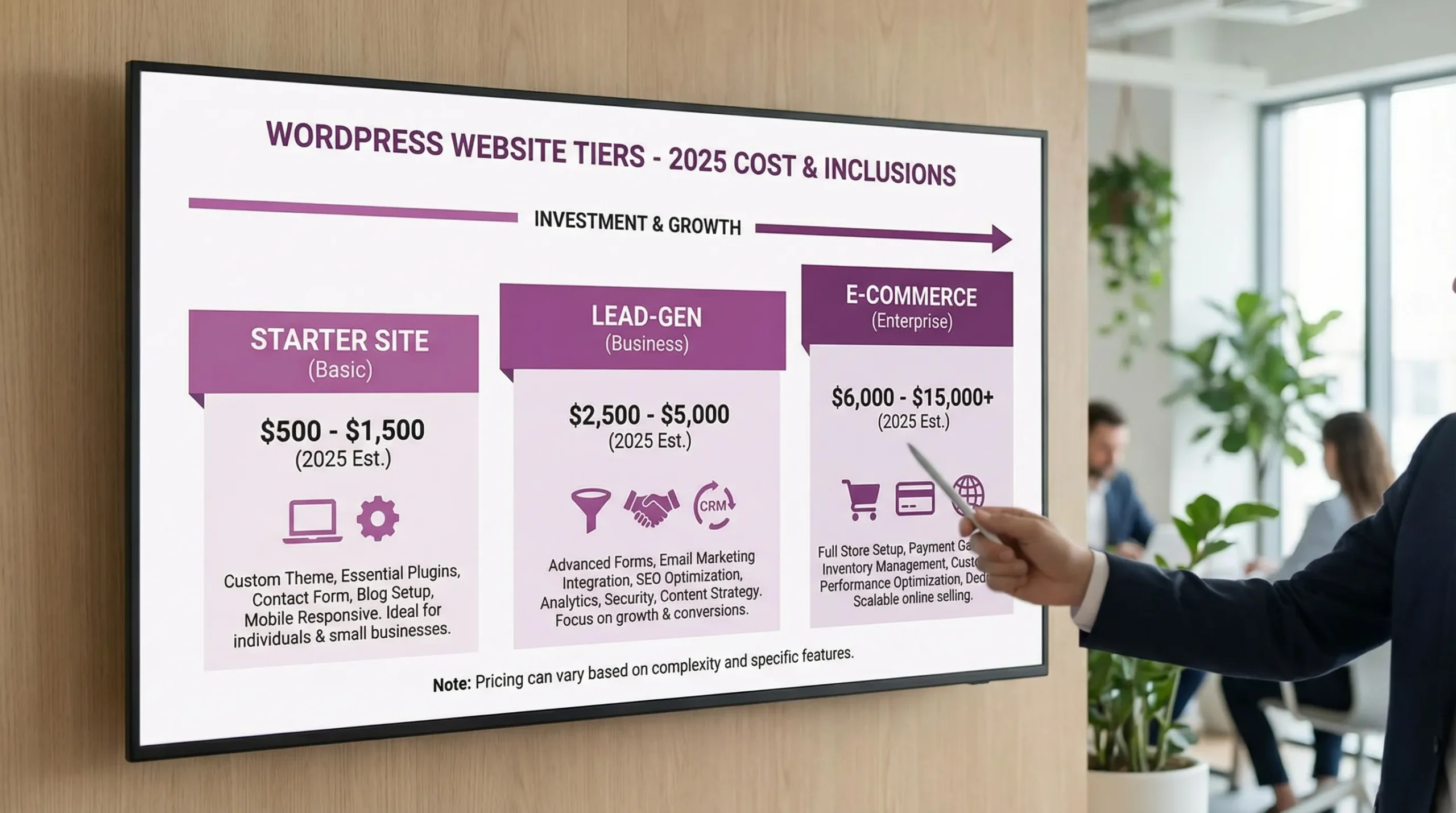
Here are typical 2025 project ranges you’ll see for small businesses when hiring a WordPress web designer.
| Website type (WordPress) | Best for | Typical cost range (2025) | Timeline (typical) |
|---|---|---|---|
| Starter brochure site (1–5 pages) | New businesses, simple “call us” sites | $1,000 to $3,500 | 1 to 3 weeks |
| Lead-gen small business site (5–12 pages) | Service businesses that need calls, form leads | $3,500 to $8,500 | 3 to 6 weeks |
| Local SEO focused site (city/service pages + on-page SEO) | Businesses competing in LA-area search | $5,000 to $12,000 | 4 to 8 weeks |
| Small e-commerce (WooCommerce, simple shipping/tax) | 10–100 products, local delivery or shipping | $6,000 to $18,000 | 6 to 12 weeks |
| Advanced e-commerce (subscriptions, complex rules, integrations) | High order volume, custom workflows | $15,000 to $50,000+ | 10+ weeks |
| Custom WordPress build (custom blocks, heavy integrations) | Unique UX, performance, custom admin workflows | $12,000 to $60,000+ | 8+ weeks |
These ranges assume a professional process (strategy, design, build, testing, launch). The biggest pricing swings happen when a quote includes (or excludes) content, SEO fundamentals, accessibility, and integrations.
What actually changes the price of a WordPress website
Two businesses can both ask for a “WordPress site” and get quotes that are 5x apart, because the word “site” hides a lot of work. These are the cost drivers that most often move your quote.
1) How many templates you need (not just pages)
A “10-page website” might only need 2 templates (a general page + a contact page). Or it might need 8 templates (services, service detail, industries, locations, case studies, blog, landing pages, and a resource hub). More templates means more design and more development.
2) Content readiness (copy + photos)
If you already have:
- Clean service descriptions
- Real photos of your team, work, and location
- A clear value proposition
…your project gets cheaper and faster.
If your designer has to help create or rewrite the content, the quote goes up, and that’s often worth it because copy quality is a major conversion lever.
3) Custom design vs theme customization
There’s a difference between:
- Setting up a quality theme and tailoring it responsibly
- Designing a custom look (and building it with a block theme or custom components)
Custom design costs more, but it can be the right move when your competitors all look the same, or when you need a very clear conversion path.
4) SEO foundations (especially local SEO)
Many “cheap” WordPress builds skip the basics that help you show up in local search.
Common SEO line items that affect cost:
- Technical setup (indexing, sitemaps, canonical handling)
- On-page SEO (titles, headings, internal links)
- Local service area structure (cities, neighborhoods, service pages)
- Performance work (Core Web Vitals, image optimization)
- Schema markup (LocalBusiness, Service, FAQ)
If you’re competing in Los Angeles, SEO fundamentals often determine whether your site is a brochure or a lead engine.
5) Integrations and automation
Integrations are where WordPress projects quietly turn into “software projects.” Examples:
- CRM integration (HubSpot, Zoho, GoHighLevel, custom CRMs)
- Quote requests that route to different teams
- Booking systems
- Payment processors
- Email marketing automations
If you want your website to do more than collect form submissions, budget for integration time.
6) Accessibility and compliance requirements
In 2025, accessibility is not a “nice to have” for many businesses, it’s risk management and good UX. Building with accessibility in mind affects design choices, component selection, and QA time (keyboard navigation, contrast, form labels, focus states).
Why “near me” affects pricing (and when it should)
Hiring locally can change cost, but the bigger difference is usually the process and accountability.
When local costs more
Local teams sometimes price higher because:
- Their labor market is higher (common in major metros)
- They include in-person discovery, onsite photo capture, or stakeholder sessions
- They bundle local SEO setup because they know the market
When local can be a better value
A local WordPress web designer can be a better value if they:
- Understand your service area and how people search (city, neighborhood, “near me” intent)
- Help you prioritize what matters for local conversions (calls, maps, reviews, trust)
- Provide faster support when something breaks or you need changes
For example, an organization focused on community participation may prioritize clear calls to action and movement messaging, similar to what you see on JustSocial.io (a direct democracy movement site). Different goals require different site structures, and a good local partner helps you choose what matters instead of paying for random features.
Hourly rates you may see in 2025 (WordPress)
Even if you’re getting a project quote, it helps to understand the hourly reality underneath it.
| Provider type | Typical hourly range (2025) | Best use case |
|---|---|---|
| Freelance WordPress designer | $50 to $125/hr | Small sites, design refreshes, landing pages |
| WordPress developer (custom code) | $90 to $180/hr | Performance fixes, custom blocks, integrations |
| Small local studio (designer + dev) | $100 to $200/hr | Full builds with strategy, QA, support |
| Agency (broader team) | $150 to $300+/hr | Larger brands, complex UX, multi-channel marketing |
Rates vary widely by region, portfolio strength, and whether you’re hiring someone who can own strategy (not just “make it look good”).
The hidden costs to plan for (your real 12-month WordPress budget)
The build cost is only part of the spend. Here are the recurring costs most small businesses should plan for.
| Cost item | What it covers | Typical range |
|---|---|---|
| Hosting | Server, caching, backups (varies by provider) | $15 to $100+/mo |
| Maintenance | Updates, security checks, small fixes | $50 to $300+/mo |
| Premium plugins | Forms, SEO tools, backups, security, page builders (if used) | $0 to $50+/mo each |
| Content updates | New pages, photos, blog support | Varies (hourly or retainer) |
| SEO / lead generation | Ongoing ranking, content, GBP optimization, campaigns | Varies (often $500+/mo) |
A practical rule: if your website is important to revenue, budget for maintenance. WordPress is powerful, but it is also an actively updated ecosystem (core, theme, plugins), and ignoring updates is one of the fastest paths to security and stability problems.
What a good 2025 WordPress quote should include (so you can compare apples to apples)
When two proposals are priced differently, it’s often because one leaves out critical deliverables. Here’s what to look for in a professional scope.
Core deliverables that should be clearly listed
- Page count and template types (homepage, services, contact, blog, location pages)
- Design process (mockups or component system, revision rounds)
- Mobile-first build and responsiveness
- Performance basics (image optimization, caching approach)
- SEO foundations (metadata, indexing setup, redirects if replacing an old site)
- Analytics setup (GA4 and Search Console, or your preferred stack)
- Security basics (SSL, spam protection, least-privilege admin access)
- Launch plan (staging, QA, go-live checklist)
Clarify what is out of scope
A trustworthy quote tells you what is not included, for example:
- Copywriting and photo sourcing
- Advanced SEO campaigns
- Ongoing content creation
- CRM automation beyond basic lead capture
- E-commerce product uploads (who loads products, taxes, shipping rules)
If it’s not written, assume it’s not included.
How to get an accurate “near me” estimate quickly
If you want a fast, accurate estimate from a local WordPress web designer, come prepared with:
- Your top goal (calls, quotes, bookings, online orders)
- A list of services (and the cities you serve)
- 2–3 competitor websites you like (and why)
- Any must-have integrations (CRM, booking, payments)
- Whether you have content ready (logo, photos, existing copy)
In many cases, a designer can give you a realistic range after a short discovery call, and a firm quote after they confirm scope and content.
Common red flags when pricing a WordPress designer
Low prices are not automatically bad, but they often signal missing work. Watch for:
- Vague proposals (“up to 10 pages” with no detail)
- No mention of performance, SEO, or mobile QA
- Heavy reliance on a page builder with no plan for speed
- No plan for updates, backups, or security
- A quote that excludes launch support (handoff only)
The goal is not to pay the most, it’s to pay for the work that prevents redoing the site in 6 to 12 months.
Frequently Asked Questions
How much does a WordPress web designer near me cost in 2025? Most small business WordPress projects land between $3,500 and $12,000 depending on pages, design level, local SEO, and integrations. Simple brochure sites can be less, e-commerce and custom builds are more.
Why are some WordPress quotes under $1,000? These quotes usually assume a pre-made template, minimal strategy, limited QA, and little to no SEO, performance work, or accessibility testing. It can work for a temporary presence, but it often costs more later to fix.
Is it cheaper to hire a remote WordPress designer instead of someone near me? Sometimes the sticker price is lower, but you might lose local market insight, faster communication, and ongoing support. The best value depends on your need for local SEO, collaboration, and responsiveness.
What should be included in a WordPress maintenance plan? At minimum, WordPress core/theme/plugin updates, backups, security monitoring, uptime checks, and a process for fixing issues fast. Many businesses also include small content edits and performance monitoring.
Do I need WordPress if I only need a simple website? Not always. If you need the lowest effort solution, a site builder can work. If you care about long-term SEO, flexibility, ownership, and integrations, WordPress is often the stronger option.
Get a transparent WordPress quote from a local team
If you’re in Los Angeles or the Inland Empire and want a WordPress site that loads fast, ranks locally, and actually generates leads, Brother Web Design can help you scope it correctly and avoid surprise costs.
Reach out through Brother Web Design with your business type, service area, and a couple of example sites you like, and we’ll help you map the simplest build that still hits your growth goals.